Recently we started a new pilot project for Microsoft Fabric using D365 F&O (ERP) as the data source utilizing Synapse Link to get it out of Dataverse. If you are familiar with this architecture pattern, you know it can be pretty painful at times. Alas, Fabric Link will not work for us at this time, so I’ll just leave it at that for now. Just know that this problem is specific to a Synapse Link setup.
Previously, Spark 3.4 was not available to use for Synapse Link. That has creating a bit of a panic from people using D365 F&O with Synapse Link, because Spark 3.3 is going out of support on March 31, 2025. I don’t know what the cost of D365 F&O is for most, but I’m pretty sure it’s like a gazillion dollars. Recently I saw people were starting to use Spark 3.4 with D365 F&O and Synapse Link, but they were also having trouble.
Getting around some other issues we’ve been encountering, we were finally able to set up our Synapse Link. The setup screen confirmed we needed to use Spark 3.3.
UPDATE: The UI below now properly says Spark 3.4, but I’m leaving this here in case it happens with another version in the future.
Here’s a close up in case you can’t see it:
The problem was, after I filled out all the other required information, there was nothing in the drop down box for spark. I confirmed on the Azure side that everything was set up correctly and that Synapse and the storage account were seeing each other, but nothing in the drop box.
Now at this point I could drag this post out and tell you all the things I did to try and fix it, but I’m getting a little annoyed at unnecessarily long posts lately, so I just skip to the solution: Spark 3.4 is actually required now.
Once we recreated a spark 3.4 pool, all of a sudden it appeared in the drop down box and we could move to the next screen. Unfortunately right after we got that fixed we ran into a Spark 3.4 bug, but that was fixed and pushed out in about 2 days. Finally we can move on to the Fabric portion of our project.
Note: we did let Microsoft know about erroneous message for 3.3, but as of yesterday it was still showing up when you go to set up a new Synapse Link. Showing up correctly when I checked again on Feb 6th.
If you’ve bought a P1 reserved capacity, you may have been told “No worries – it’s the same as an F64!” (Or really, this is probably the case for any P to F sku conversion.) Just as you suspected – that’s not entirely accurate. And if you are trying to create Fabric shortcuts on a storage account that uses a virtual network or IP filtering – it’s not going to work.
The problem seems to lie in the fact that P1 is not really an Azure resource in the same way an F sku is. So when you go to create your shortcut following all the recommend settings (more on that in a minute), you’ll wind up with some random authentication message like the one below “Unable to load. Error 403 – This request is not authorized to perform this operation”:
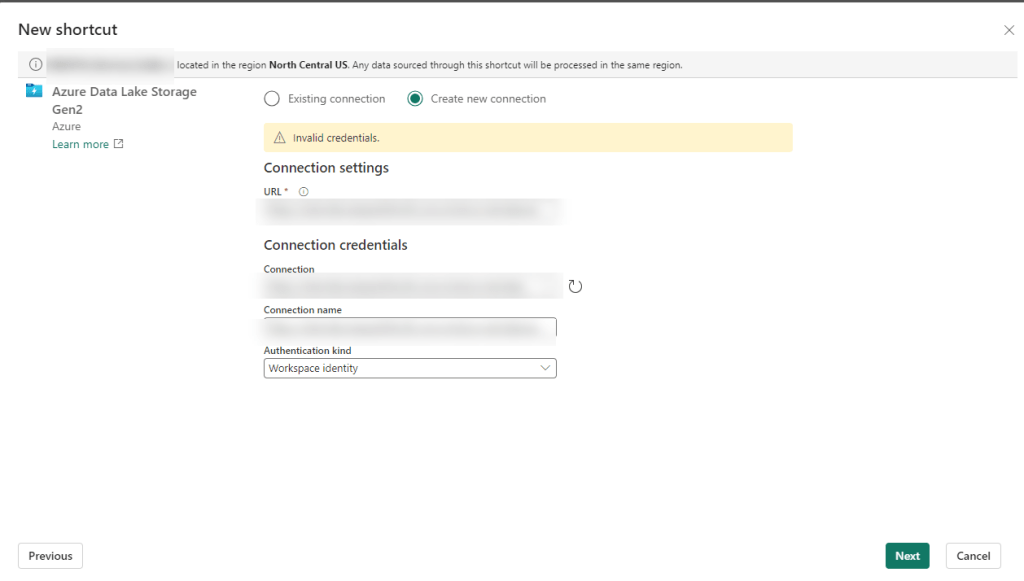
You may not even get that far and just have some highly specific error message like “Invalid Credentials”:
Giving the benefit of the doubt – you may be thinking there was user error. There are a gazillion settings, maybe we missed one. Maybe, something has been updated in the last month, week, minute… Fair enough – let’s go and check all of those.
Building Fabric shortcuts, means you are building OneLake shortcuts. So naturally I first found the Microsoft Fabric Update Blog announcement that pertained to this problem: Introducing Trusted Workspace Access for OneLake Shortcuts. That walks through this EXACT functionality, so I recreated everything from scratch and voila! Except no “voila” and still no shortcuts.
Okay, well – no worries, there’s another link at the bottom of the update blog: Trusted workspace access. Surely with this official and up-to-date documentation, we can get the shortcuts up and running.
Immediately we have a pause moment with the wording “can only be used in F SKU capacities”. It mentions it’s not supported in trial capacities (and I can confirm this is true), but we were told that a P1 was functionally the same as an F64 so we should be good right?
Further down the article, there is a mention of creating a resource instance rule. If this is your first time setting all of this up, you don’t even need this option, but it may be useful if you don’t want to add the Exception “Allow Azure services on the trusted services list to access this storage account.” to the networking section of your storage account. But this certainly won’t fix your current problem. Still, good to go through all this documentation and make sure you have everything set up properly.
One additional callout I’d like to make is the Restrictions and Considerations part of the documentation. It mentions: Only organizational account or service principal must be used for authentication to storage accounts for trusted workspace access. Lots of Microsoft support people pointed to this as our problem, and I had to show them not only was it not our problem, but it wasn’t even correct. It’s actually a fairly confusing statement because the a big part of this article is setting up the workspace identity, and then that line reads like you can’t use workspace identity to authenticate. I’m happy to report using the workspace identity worked fine for us once we got our “fix” in (I use that term loosely) and without the fix we still had a problem if we tried to use the other options available for authentication (including organizational account).
After some more digging, on the Microsoft Fabric features page, we see that P SKUs are actually not the same as F SKU in some really important ways. And using shortcuts to an Azure Storage Account that are set using anything but to Public network access: Enabled from all networks (which BTW – is against Microsoft best practice recommendations) is not going to work on a P1.
The Solution
You are not going to like this. You have 2 options. The first one is the easiest, but in my experience very few enterprise companies will want to do this since it goes against Microsoft’s own best practice recommendation: Change your storage account Network setting to: Public network access enabled from all networks.
Don’t like that option? You’re probably not going to like #2 either. Particularly if you have a long time left on your P SKU capacity. The solution is to spin up a F SKU. In addition to your P SKU.And as of the writing of this article, you can not convert a P SKU to an F SKU, meaning if you got that reserved capacity earlier this year – you are out of luck.
In our case, we have a deadline for moving our on-prem ERP solution to D365 F&O (F&SCM) and that deadline includes moving our data warehouse in parallel. Very small window for moving everything and making sure the business can still run on a new ERP system with a completely new data warehouse infrastructure.
We’d have to spend a minimum of double what we are paying now, 10K a month instead of 5k a month, and that’s only if we bought a reserved F64 capacity. If we wanted to do a pay-as-go, that 8K+ more a month, which we’d probably need to do until we figure out if we should do 1 capacity, or multiple (potentially smaller) capacities to separate prod/non-prod/reporting environments. We are now talking in the range of over 40K additional at a minimum just to use the shortcut feature, not to mention we currently only use a tiny fraction of our P1 capacity. I can’t even imagine for companies that purchased a 3-year P capacity recently. (According to MS, you could have bought that up until June 30 of this year.)
Ultimately many companies and Data Engineers in the same position will need to decide if they do their development in Fabric, Synapse, or something else all together. Or maybe, just maybe, Microsoft can figure out how to convert that P1 to an F64. Like STAT.
On Today’s episode of “What’s the Problem in Synapse Now?” we take a look at Synapse Link for the Dataverse (shocker – I know.)
Let’s get right too it – we are talking about the error message: “You have not linked a Dynamics 365 Finance and Operations environment. Link an environment to see tables. See https://aka.ms/FnOTablesInSynapseLink“*. And oddly enough, our D365 F&O tab will have some variation of x of 0 selected.
Wait a minute – this was working perfectly fine a few days ago – ok – that may be – or maybe this is your first go at it, either way you are going to use the same solution.
So what do you do? Simple, close the managed tables tab. Next, and just as a precautionary, make sure you are in the correct environment, and that the environment is running. It’s not uncommon for lower environments to have a nightly shutoff switch. That’s probably not the cause, but it doesn’t hurt to check.
Now that you’ve checked the environment and have ruled that out, let’s discuss a common cause: your authentication has gotten boogered up. That’s the technical term for it: BOOGERED UP.
If using Managed Identity (which you should be), then the easiest fix is to click on that button at the top called Use Managed Identity.
That’s it. Soon you should see some movement for anything currently in place or if you were adding/changing some current tables, click on the Manage Tables button again to get back to where you were. Your error will hopefully be resolved. If you didn’t use managed identity with D365 F&O and Synapse Link, you may want to revaluate your life choices like I recently did. (JK – kinda of.) But if you didn’t, then you’ll have to make sure your storage account can talk to your Power Apps D365 F&O Synapse Link. I’ll save that rabbit hole for another day.
* Note, there is actually some good stuff in the link that the error message provides which at the time of this writing, resolves to: https://learn.microsoft.com/en-us/power-apps/maker/data-platform/azure-synapse-link-select-fno-data It’s a lot of information so hopefully this tip will save you a bunch of time reading through the whole thing. But if you are starting a Synapse Link for Dataverse from scratch, or if this post doesn’t correct your issue, definitely go back to that link and step through each part. It won’t be your first or last visit…
This error has become the bane of my existence – with multiple configuration setups. Basically, anytime I dared to change the Synapse workspace to not allow all access in the Network settings, I was bound to run into it. Today’s tidbit only addresses ONE way that might solve this error, but it is so maddingly simple that I decided to throw it up on my blog. I’ll save the rant of all the different rabbit holes I’ve been down in the last month for the “BEST PRACTICE SAYS YOU HAVE TO DO THIS <oh except it’s not allowed in these cases and I’m going to bury that information on some small page.>” Hopefully I’ll post all the different ways to address this problem at some point.
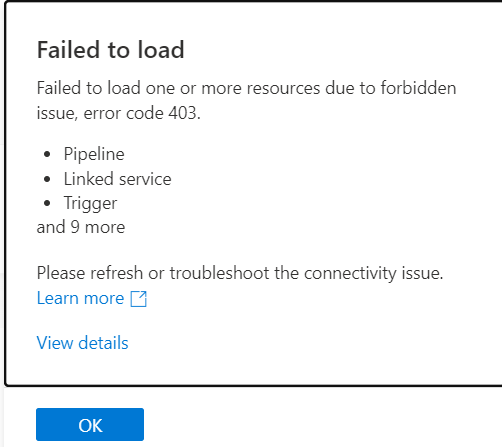
First let’s look at the error message that you see when you open up your Synapse workspace. “Failed to load. Failed to load one or more resources due to forbidden issue, error code 403.”
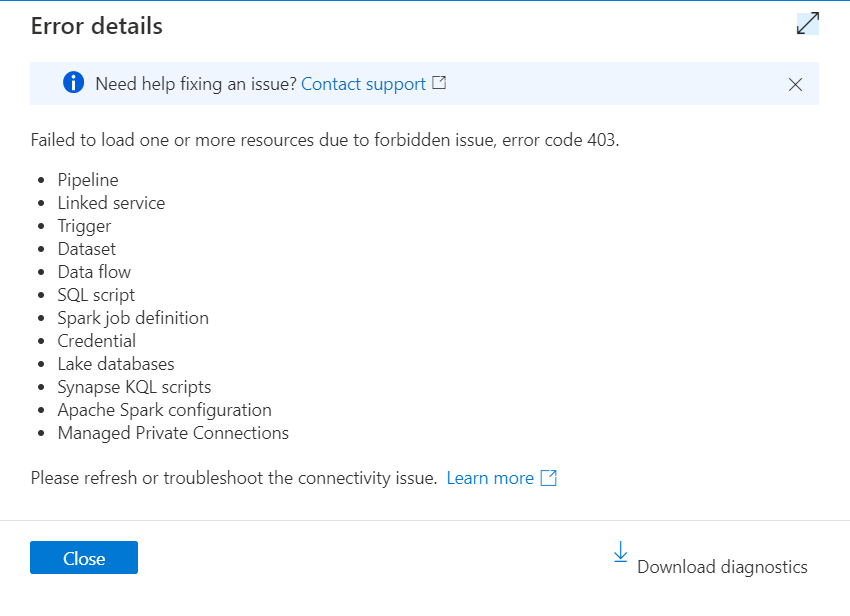
Hmmmmm, what is this “View details” you speak of?
Oh, ok. It’s just really telling me all the things that aren’t working. Awesome. And don’t let that “download diagnostics” button fool you. It’s not going to tell you anything helpful. (I know, shocking.)
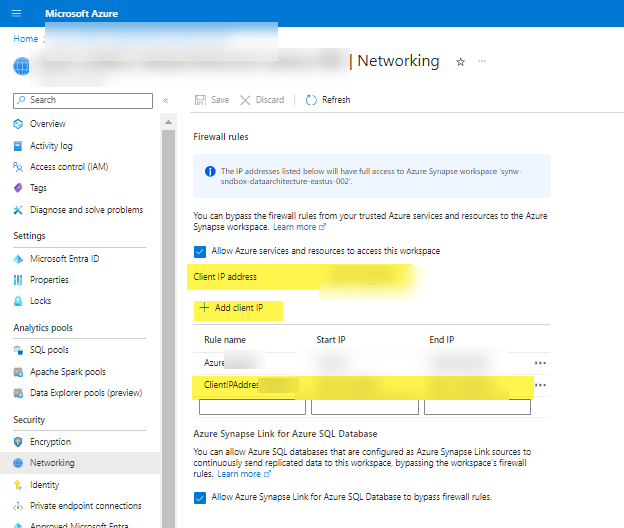
So what’s the 2 second fix you can check before getting lost down your own rabbit hole? A little thing in the Azure portal, under your Synapse workspace in the Network settings. Drum role……..make sure you have your own IP address (ahem, “Client IP address”) added as a rule with whatever other network rules you’ve got going on. ARE YOU FREAKING KIDDING ME?
If you are thinking “yea, duh, there is a little button that says ‘Add client IP'” then ShutIT. They put that image slam in the middle of one of the Microsoft Learn pages without context in the middle of something else completely, so by the time you (ok me) finish the other thing that the article was about, I’ve completely forgotten about this rando item. And apparently I’m not the only one because I’ve screen shared with a ton of super smart people (including MS peeps) and no one even noticed my IP wasn’t added.
For the record, my new mantra is “they created Fabric because they realized they had to simplify Synapse configurations. Microsoft realized too many people were getting pissed.”
UPDATE: If using PBI as a developer using desktop, you may have to add that person’s IP address to the firewall rules as well. Otherwise they may have issues refreshing tables.
This post is a continuation from Part 1: Preplanning and Evaluation in a 9 part series. If you want to download the full checklist or slides without all the wordy-word stuff: you can find it in this Github repository. (The checklist has wordy-word stuff. No getting around that.)
Topics covered today:
Digital Estate
Data Management
Data Lineage
Pilot Project
Digital Estate
Understanding your digital estate at the beginning of your project will help you determine what to assess and migrate down the road. Even if you already think you know all the things you need to migrate, it’s helpful to check how all of the things may be connected. You need to identify your infrastructure, applications, and all the dependencies. You don’t want any surprises! Don’t just rely on old documentation.
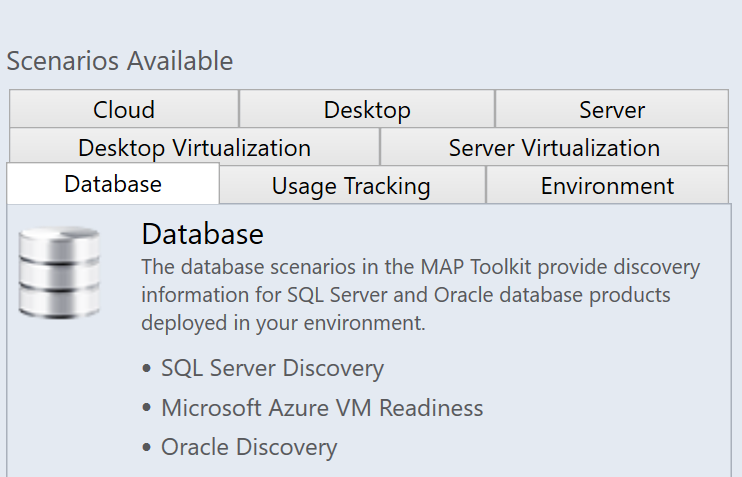
Azure Migrate has a Discovery and Assessment tool that can assist in this task, but there are certainly many other ways to acquire this information. You may have other 3rd party tools or internal processes that already gather this information for you. Just make sure that it is UTD. Personally, I really like the free pre-Azure Migrate solution: Microsoft Assessment and Planning Toolkit as it dumps everything in excel sheets that Admins and Management tend to like to see. But the visual display of Migrate (and ALL the additional tools) is pretty fantastic.
Some options available in the MAP Toolkit
Whatever tool you use, from a database perspective, you want to know things like what database systems are in your environment, what version and edition they are on, how many databases may be on an instance, what are the database names, file sizes, statuses, users, configurations, and other various database metadata. You are going to want to know some performance metric results and additional server details. You are going to want to know the various components that are installed on your servers, details about those components, and how they are used. Are you REALLY using those SSRS and SSAS components and if so, how?
Lastly, you want to make sure you know all of your relationships between applications, instances, database objects, and processes. It’s no fun to find out later that you had a database with hard-coded servers in some stored procedures or unknown linked server requirements. Or a SQL job that PBI Report Server created for each data refresh.
The Key Take-Aways here:
1.) Identify the infrastructure : things like servers
2.) Identify what apps do they use – this includes all your SQL server apps!
3.) And identify dependencies they may have: Internally and across servers. Don’t forget to include things like ports/networking
Data Management
Now is the time to find out what documentation you have about your data (and what you need to get). Having this information is essential if you determine you need to move things in parts or if you have overlap in data that might be potentially consolidated. This will help you down the road when we get into some architecture designs with the 5 Rs of rationalization. Our focus here is on having a data dictionary, a business glossary, a data catalog, and classifying your data.
A quick summary of these terms: a data dictionary helps you to understand and trust data in databases better, a business glossary provides a common language for the organization when it comes to business concepts and metrics, a data catalog helps you to find, understand, trust and collaborate on data, and data classification groups your data elements to make it easier to sort, retrieve, and store.
Why are these things important for migration? First off, they are important just from a data governance standpoint. But more than that, knowing this information up front can save you a lot of headaches down the road. You may have business requirements for some of your data to be labeled in a security context. Maybe you are dealing with highly classified government data, health care data, or HR data. Or you may find you have data type mismatches? And data catalogs often review hidden dependencies that you may not have otherwise known.
All is not lost if you don’t have all of this. Azure has some internal tools like Purview to assist with this, and there are plenty of 3rd party tools. If you are like me, you already carry a script toolbox from the lifetime of your career (some of those scripts from 20 years ago still work!) that you can easily use. Apart from the Business Glossary, there are so many free options and scripts out there that this should not be a showstopper for you. For the Business Glossary – you are going to have to go to the source – your subject matter experts (SMEs).
Data Lineage
In addition to the previous items we mentioned for data management, I want to call out data lineage specifically.
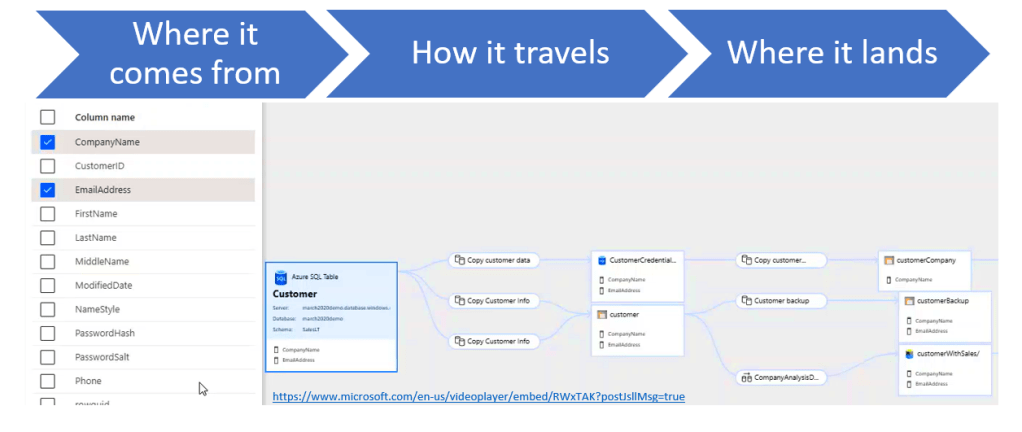
Data lineage gives you insight into how your data flows. It helps you understand how your data is connected and the impact of how changes to your data, processes, and structure, affects the flow and quality of your data. KNOW YOUR DATA FLOW. Find out where your data comes from, how it travels, the place(s) it lands, and ultimately, where it else it goes.
There are a lot of tools that will help you with data lineage; with various levels of sophistication. Long gone are the days where you must shift through excel sheets to figure it all out. That’s why graphical tools like Purview are really exciting for me. [Note: from initial insights into Purview costs once it’s past the preview stage – it gets pretty pricey, fast.] This is an image of Azure Purview and I wanted to show how granular it can get at the column level and how it travels through various processes and databases.
The column level feature is really really nice. It’s not necessary at this stage, but it certainly is helpful to you at the testing and troubleshooting phases. What you really need with your data lineage at this stage – and you can still see it in this graph – is how your dataflows between resources. Because this is a great way to discover things you may not be aware of in your data flow process that you need to pull into your migration plan.
What also can data lineage help with? Reporting considerations. Knowing what can break in a report, if you change at at the source is invaluable. While getting a big picture of what reports, models, applications may be impacted after a migration help circumvent some nasty surprises.
Pilot Project
If you haven’t moved anything to the cloud previously that is related to your infrastructure, then consider having a much smaller pilot project. One that will get you a feel for all of these steps but has a lower risk than your overall project.
What items do you look for in a pilot project?
Maybe you have a database that is only used for a small app that is low risk if the migration doesn’t go as expected. Try to keep your pilot project to applications with just a few dependencies. The goal of this is to a.) help you understand the process and b.) get you a quick win that you can show to stakeholders.
You want one that is low-risk, that is small enough to manage easily, but still large enough with a long enough duration to give you a good understanding of the processes involved. Besides size and duration, the criticality of your project is important. You want to incorporate a visible win that is important to your company that supports making bigger moves.
Finally, ff you’ve already done this previously, then this is when you review what you’ve learned from your previous pilot project. What were gotchas? What went really well? What is easily repeatable and what do you need to get down on paper?
Welp, we’ve come to the end of part 2. Feel free to hit me up with items you think I’ve missed or you want more clarification on. Next week is a much needed break for me, so [probably] no updates from me. Hope everyone has a wonderful Mother’s Day!
If you are a follower of me in the various places or a reader of this blog, you know that recently I presented the session Migrating data solutions to the cloud: a checklist at SQLBits 2023. As promised in the weekly wrap-up from April 7th, here is the first installment of a more in depth dive to that session. The session had 9 parts to it and so I thought that would make for nice chunks to consume in blog posts. I’ll add links to each one so it will be easy to navigate once all of the posts are up.
The Parts are broken down as follows:
Pre-Planning and Evaluation
Discovery
Assess
Architecture
Costs
Migrate
Testing
Post – Migration
Resources and Closing
This post will focus on the first item in the list Pre-Planning and Evaluation.
Let’s get right to it! Ok ok. I know you are probably chomping at the bit wanting to immediately get into the technical parts – I know how it goes – but that is not where you start.
“Begin at the beginning,” the King said, very gravely, “and go on till you come to the end: then stop.”
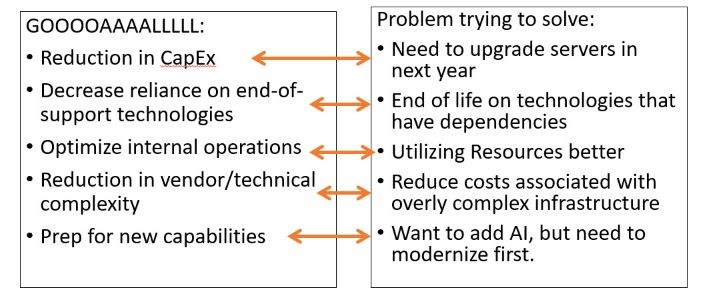
What is your company’s goal of moving to the cloud? Some examples are:
Reduction in CapEx (capital expenditures)
Lower reliance of complex and/or end-of-support technologies
Optimization of internal operations
Reduction in vendor or technical complexity
Preparation for new technical capabilities
Modernization? Cost-savings? Multiple things? Maybe your current infrastructure is at end-of-life, and it just really makes sense to modernize it and move it over to the cloud before you are dead in the water. Or maybe your goal is to reduce downtime for managing infrastructure and upgrades .
What is the problem you are trying to solve? Is there a business requirement driving this or maybe something else? Make sure you understand what the problems are you are trying to solve and if your goals actually address those problems. That is a business decision that has to be determined WITH your technical team and not necessarily BY your technical team. I’m a technical person, and I’m going to be the first person drawn by the shiny new object – which often is not the best thing for the company strategy.
Ultimately your problems can drive a portion of your goals, but you may have additional objectives. These items need to be determined upfront so the choices you make during the process align. They create value streams for your organization. Higher ups love to hear about value streams!
Once you have your objectives – you can create a plan and KPIs towards those objectives and then show how you met those at the end. This is our objective, this is the state at the beginning, this is the state at the end. Look how far we’ve come!!!
It’s hard to have project success if you don’t define what your objectives are. This is a project, and if you’ve been working on projects for a while, you know how easy it is to go sideways and lose sight of your goals. Sometimes those goals change a bit, and that’s ok, but ultimately your success will be measured by if you achieve clearly defined goals that you can apply metrics towards.
Support
Executive Support
Many times, you will go into a migration project that is being driven by the top level. Maybe your CEO went to a conference or read some important articles – and if so, you are ahead of the game (well, until you have to set expectations properly). But if you don’t already have executive support, then you need to identify an executive sponsor. Someone who is high up and can lead a cultural shift within your organization. A Champion. <insert bugle sounds here>
Stakeholder Buy In.
You need to Identify and involve key stakeholders early in the process. On both the business and IT side. Involvement and communication is key.
People don’t like change. Try telling a bunch of financial analysts that have been doing their job for over 20 years and have lived through multiple technology shifts – try telling them they won’t have Excel anymore. I promise you; it won’t be pretty. Rather than focus on what you are taking away – focus on why the change is needed, and what it gives them. How can you get their buy-in for your project, while still being honest.
If you don’t have that executive support or stakeholder support, then you may need to a little digging. What are your company’s core values? What is the 5- and 10-year plan for business initiatives? How does moving to the cloud address these? At the department level – what are primary goals and concerns from a technical perspective. How can moving to the cloud help this? Everyone’s answer will not be the same but look at how you can align key stakeholder needs with the goals of the C-Suite. Building a business case that addresses top concerns and how the cloud will help – is ideal for this situation.
Teams
The next thing we need to consider is what we will do in-house versus what we may pull in a partner for.
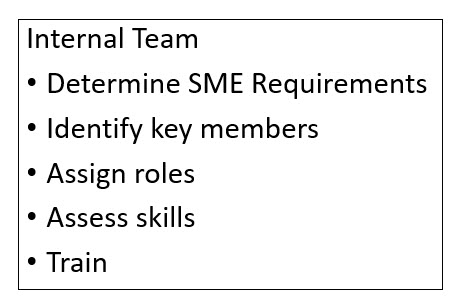
For your internal team – first determine the different areas you will need a SME (subject matter expert) for, and a good idea of what they need to know. Second, identify potential key people you may have in-house to fulfill these roles. Ideally you will have people in your organization from across many teams that you can assign to roles. Once you have assigned roles to people, you need to assess their skills. This will allow you to see what gaps you need to fill and then plan for how your org will both fill and monitor those domain gaps?
When possible, identify potential team members that either have the skills or can upskill. Build a skills readiness plan. Investing in your people is far cheaper than hiring outside help. Consultants are great – I know, I’ve been one, but there is no replacement for having in-house knowledge, particularly once those consultants have finished and walked out the door – potentially without much knowledge transfer. The people that will be maintaining and growing your systems need to have the skills.
That said, in some cases, you may want to hire outside help. Maybe many of your team members are really spread thin, or the upskill process doesn’t match the timeline – then definitely bring in consultants.
Strategy: Help with defining all things such as business strategy, business cases, and technology strategies
Plan: Help with discovery tasks, such as assessment of the digital estate and development of a cloud adoption plan.
Ready: Support with landing zone tasks.
Migrate: Support or execute all direct migration tasks
Innovate: Support changes in architecture
Govern: Assist with tasks related to governance
Manage: Help with ongoing management of post-migration tasks
Along the lines of consultants – help them help you. Does your company have standards or best practices that are specific to your industry or workflow? Share that with them. Share any and all documentation that is relevant to your migration and environment.
If your company is able – consider Creating a board for key team members to interact and meet regularly: like a Cloud Center of Excellence (CCoE). Key members are chosen from each IT areas to meet at a specified cadence to discuss all things Azure including identifying domain gaps. Those key members not only gain knowledge about technical aspects, but also get insight into projects that are going on through the different areas of the company. And they can take back that information to their team with a level of consistency. Which is super important when you are wanting establish best practices and standardize policies across teams.
Documentation
Now we need to find out what we have regarding documentation.
From the technical side you need to assess at what your current infrastructure looks like. What type of documentation do you have for your data estate and infrastructure?? Where is your data? What does your data require for things like storage and memory? What are all the components that connect to what you want to move? If you don’t know what your current infrastructure looks like, you need to determine how and who will document that for you.
On the business side: What are business requirements for your systems? Do you have regulatory requirements? SLAs mandating certain uptimes? What about other Business requirement docs for security, compliance, backup, Recovery Point Objectives (RPO) and Recovery Time Objectives (RTO)?
And finally – have you previously tried to do a cloud migration? What documentation is left over from that? Is it current? What were some of the successes and some of the failures? Any lessons learned?
You don’t have to know everything at this point, but you do need to find out what you have and what you don’t have. And if we are perfectly honest – what may be out-of-date. This is where you need an Enterprise Architect and some in-depth meetings with the different departments. Communication is key to getting the documentation and finding what you have, what you don’t have, and what you may need down the line.
Welp, that concludes Part 1: Pre-Planning and Evaluation. What would you add to this list? Have I missed any additional parts that you’d like to see in the over all series? I love to get feedback to consider so feel free to reach out.











 Data Work Mom