
Fabric Rest APIs – A Real World Example with FUAM

In our world of AI generated material, I wanted to be clear that content posted by me has been written by me. In some instances AI may be used, but will be explicitly called out either in these article notes (e.g. if used to help clean up formatting, wording etc..) or directly in the article because it is relevant to what I am referring to (e.g. “Fabric CoPilot explains the expression as…”). Since articles are written by me and come from my experiences, you may encounter typos or such since I am ADHD and rarely have the time to write something all at once.

Recently a colleague of mine was inquiring about creating a service principal to use with a Microsoft Fabric Rest APIs proof of concept project we were wanting him to develop for some governance and automation. Since he was still in the research phase, I told him we already had one he could use and did a brief demo on how we use it with FUAM (Fabric Unified Admin Monitoring tool). It occurred to me that others may find this a useful way to learn how to use Fabric or PBI Rest APIs. If you are also fairly new to using pipelines and notebooks in Fabric, then you can get the added bonus of learning through an already created, well-designed and active live Fabric project in your own enviroment. If you do not have FUAM installed in a Fabric capacity, or do not have permissions to see the items in the FUAM workspace, or have no intention/ability do change either of those blockers, then you can stop reading here. Unless you are just generally curious – then feel free to read-on. Or not. You do what works for you.

Incidentally, if you haven’t implemented FUAM and are actively using Microsoft Fabric, I highly recommend it. There is a lot of great information about your environment that is all in one place, and has great potential for you to create add-ons. You don’t even need a heckuva lot of experience to implement it, and once you get the core part up and running, it’s pretty solid (with regular updates that are optional).

How FUAM Uses Fabric Rest API Calls

The FUAM workspace/project uses Fabric/PBI API calls (in part) to collect various information about your Fabric environment. It uses other things too like the Fabric Capacity Metrics app, but for brevity we will only cover the REST API stuff here. FUAM stores information in it’s FUAM_Lakehouse located in the FUAM workspace. The lakehouse includes info on workspaces, capacities, activities, and a ton of other information about things that go on in Fabric.  

To see what is collected for FUAM from API calls, you need to first look at some of the pipelines. Go to your FUAM works and filter for Pipelines.
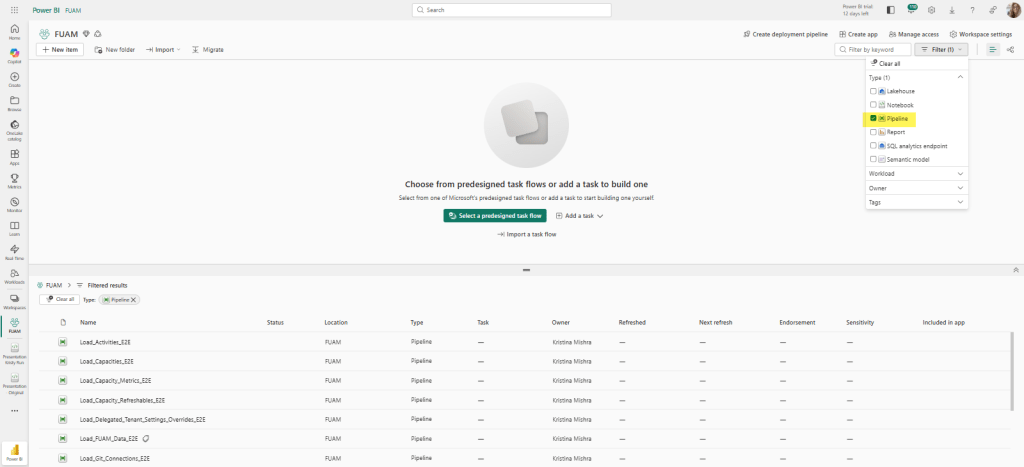
Image 1: FUAM Workspace with pipeline filter applied.

Yes, the image above shows the PBI view but it is same-sies for the Fabric view. Or close to it. You probably won’t have the tag next to the Load_FUAM_Data_E2E pipeline like I do, but that’s because I implemented a tag for that one myself. It’s the main orchestration pipeline that I want to monitor and access separately. Plus it’s the main one you access on the rare occasion you need to access any of them and I’m a visual person. All this to get to the point: that’s NOT the pipeline we want to use here.

A quick note on why you may not want to start from scratch for a project that uses Fabric REST API calls if you already have FUAM and all needed access to FUAM object.

  • You get a real world example that you can add on to if the information you need isn’t already in the lakehouse.
  • You don’t have to go through setting up a new service principal / enterprise app in Azure.
  • You don’t risk doing duplicate calls of the exact same information in different places.
  • Depending on what you are doing with the REST API and what capacity size you are on, calls can really raise your CUs.
  • You may get a tap on the shoulder from the security team if they see too many tenant info API calls.
  • There is a 500 request per 100 workspace Fabric REST API limit. You may think that there is no way you will hit that, but when I first set up FUAM , I definitely hit it a few times as I was tweaking the job runs.

So how FUAM use the REST API calls? That depends on what you are doing and how you are accessing it, but for the purposes of this post, we are going to review how it uses it inside pipelines (the first path in the image below).

For our first example, let’s take a look at the pipeline: Load_Capacityies_E2E. If you look at the Copy data activity, you will see where the Source uses a data connection that was previously set up (in this case, the data connection uses a service principal to connect).
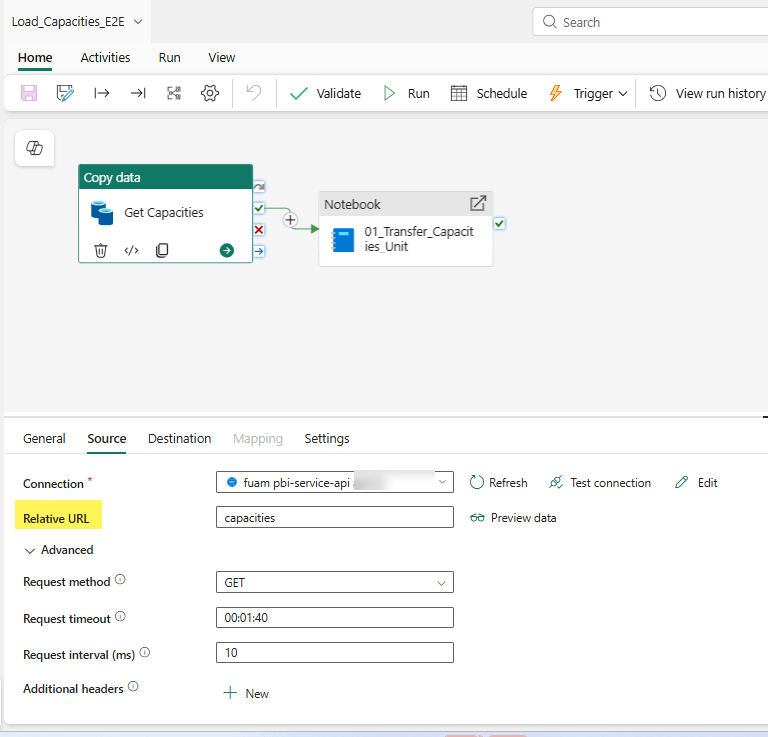
Image 3: Where the API magic happens

But it’s the Relative URL and the Request method that is doing the heavy lifting here. This is where the API call is occurring. And if you want more information on how this is automagically happening, then click on the General tab and you will see a handy dandy URL provided in the Description section.

Image 4: Handy dandy link

What is going on from Image 3, is really that Relative URL value doing the HTTP request: GET https://api.fabric.microsoft.com/v1/capacities

Image 5: image from the handy-dandy link page.

This is where the magic really occurs because it makes the API call and plops the info into a json file into the FUAM_Lakehouse under Files–>raw–>capacity.

Image 6: :Location of capacity.json file in lakehouse.

Looking back at Image 3 – the pipeline component – we see there is a notebook. The notebook listed there (01_Transfer_Capacities_Unit) is really about pulling the data from the json file, cleaning it and adapting it to a medallion architecture that ultimately lands in the Table section of the lakehouse. (That’s the short description, you should pop open the notebook yourself to walk through how that is done. If you are new to notebooks and want a walk through of what each line of code does, then plop the code snippets into Co-Pilot. It does an excellent job of code walk-thoughs.

But the heavy lift to get the data is done in the Copy data task which stores the result of the API call in the json.

That was the simple straightforward example. Once you’ve mastered that rabbit hole, you can move onto a more advanced example in FUAM: Workspaces. Workspaces is slightly different. It still uses a copy data activity in its pipeline, but it’s a little hidden (unless you are looking at icons) in the Load_PBI_Workspaces_E2E pipeline.
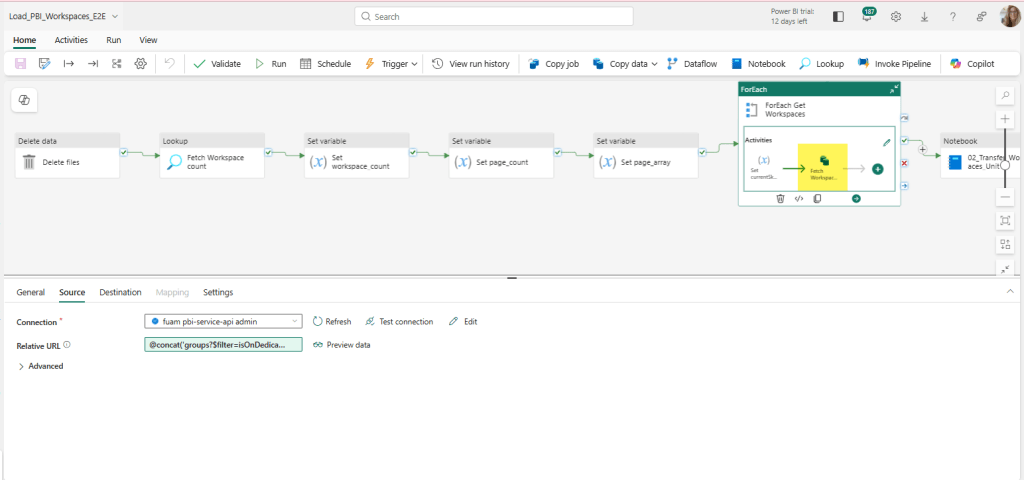
Image 7: Workspace pipeline

If we explode (aka – double click) that out from the pipeline, we can see the Copy data activity a little easier.

Image 8: Workspace Relative URL more complex.

Now the Relative URL looks different. The Relative URL here uses a Pipeline expression builder. Here is the full expression:

@concat(‘groups?$filter=isOnDedicatedCapacity eq true&$top=’,variables(‘limit’),‘&$skip=’, variables(‘currentSkip’))

Fabric Copilot explains the expression as follows:
 

This expression builds a URL string for a REST API call to fetch a list of groups (workspaces) that are on dedicated capacity. It uses the concat function to join several parts together:
– ‘groups?$filter=isOnDedicatedCapacity eq true&$top=’: This is the start of the URL, specifying that only groups with isOnDedicatedCapacity set to true should be returned, and that the number of results should be limited by the $top parameter.
variables(‘limit’): This inserts the value of the pipeline variable ‘limit’, which determines how many results to return per page (for example, 5000). – ‘&$skip=’: This adds the $skip parameter to the URL, which is used for pagination (to skip a certain number of results).
variables(‘currentSkip’): This inserts the value of the pipeline variable ‘currentSkip’, which tells the API how many results to skip (for example, 0 for the first page, 5000 for the second page, etc.).

The final result is a URL like: ‘groups?$filter=isOnDedicatedCapacity eq true&$top=5000&$skip=0’ This URL can be used to fetch a specific page of workspaces from the API, with the number of results and the starting point controlled by the ‘limit’ and ‘currentSkip’ variables. This is useful for processing large numbers of workspaces in batches (pagination).

All this to say it still calls the REST API with some added criteria, and then plops the result in a json in the FUAM_Lakehouse under the Files->raw->workspaces directory. The notebook 02_Transfer_Workspaces_Unit is similar to the capacity example, in that it pulls the data from the json file, cleans it and adapts it to a medallion architecture that ultimately lands in the Table section of the lakehouse.

Now What?

The possibilities of what you can do it pretty big. Take a look at the list of REST APIs available and suit to your needs (and permissions). Personally I’d be inclined to store it in the main FUAM lakehouse (with source control implemented of course), but I can see use cases that may put it in another workspace.

Besides using the FUAM workspace as a live example of working calls to REST APIs you can also extend your FUAM module to include more information from REST APIs that it may not already capture. It may end up being a great candidate as an add-on to your FUAM reports, or elsewhere if you want to limit security in your FUAM workspace. If you try any of this out, please share your experiences, creations, and this article so other can learn and grow as well. That’s what makes our community strong for the decades I’ve been lucky to be a part of it.

Fabric Deployment Pipeline: Can’t see anything to deploy

Microsoft Fabric deployment pipeline screenshot.

Note: At the time of this writing, this also applies to Power BI Service.

Ah, you’ve setup a deployment pipeline and let your people know it’s ready for them to do the thing. Everything looks fine on your end, so you shoot off a message to the group and go about your busy day. (Nevermind your Test environment was set up 4 months ago, Production 3 days ago, and Development was replaced 2 months ago with a new Development environment because your region changed.) You’ve added all the permission groups to each environment and added your “contributors” as Admin to the deployment pipeline (no comment), so everything should be grand.

Except… your consultant just pinged you that it’s not. You hop on a call and confirm that even though she sees all of her work in the development workspace, and she is actively developing there, it shows up as nothing in the deployment pipeline. She checks access to the Test & Production Environment. Yep, can enter the workspaces even though nothing is there. Those workspaces are expected to be empty because artifacts haven’t been promoted yet. What gives?

You check the deployment pipeline permissions again.

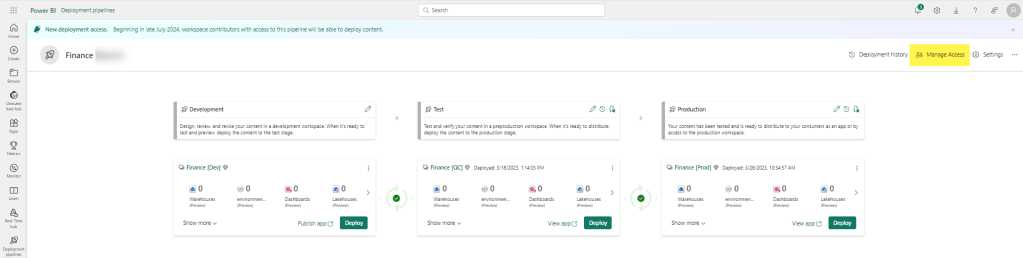
Fabric deployment pipeline screenshjot with "Manage Access" highlighted.

Yep. The user is in a group that is an Admin under Manage Access in the deployment pipeline.. (Pro-tip: if using groups, verify the person is in the group.) What else can you check?

In this instance, the problem was in the workspace permission.

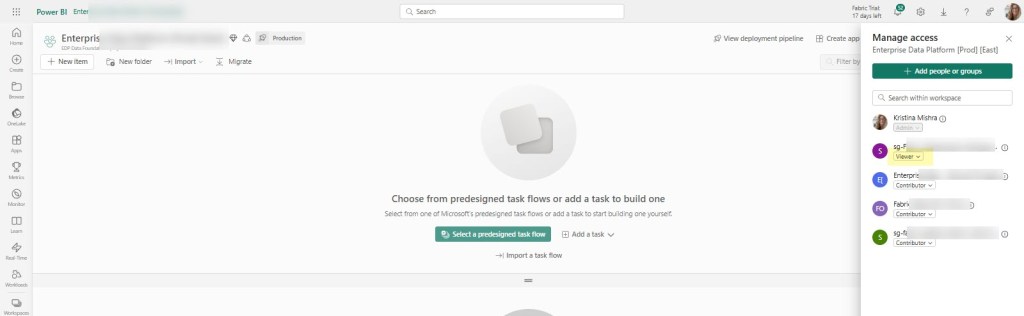
Microsoft Fabric workspace manage access screenshot.

The user was in a group in the workspace that only had Viewer permissions. This made sense when I created the workspace, because the user wasn’t going to be creating / updating things directly in the workspace (only pipelines would be doing that), but it was forgotten that the user would need the additional permissions once she was given the task to add parameters and such to the deployment pipeline. As soon as the workspace access was updated to Contributor, she was able to see the artifacts in the pipeline.

Feel free to add other areas you would have checked in the comment section.

CFS: DEI Recorded Edition!

Introducing the CFS: DEI Recorded Edition for the (Virtual) KCSSUG.

When you run a user group, conference, etc.. you sometimes are faced with the issue of not getting enough diversity in your submissions. I think about this a lot and try to figure out levers I can pull to make changes, even if they are small. Time seems to be a big factor for many in underrepresented groups, and I’m certainly no stranger to that dilemma myself.

So I’m trying something new with my user group: a recorded option that isn’t bound by a specific date/time. The idea came after realizing that there are important voices that need to be heard in the community, but having availability that coincides with a static schedule can be sometimes difficult for underrepresented speakers. I want to introduce another way for all voices to be heard: the #KCSSUG YouTube channel. In addition to providing a space for speakers to be heard, it also provides a great benefit for our members to see more content from people they can either relate to and/or get new perspectives from. Diversity of perspective and experience brings more knowledge to others.

Speakers will submit their topics as normal (please feel free to submit multiple), which will go through a normal selection process. Here are the formats options available for sessions:

  1. Have a one-on-one talk with the organizer about a specific topic. 
  2. Submit with multiple speakers to have a round table discussion with organizer.
  3. Record at home at a time convenient to you. 

If you have an idea of another option, throw it in the notes section of your submission. You can submit any length, including lightning. Let’s go crazy and not restrict ourselves.

Well – actually – there is a restriction. Technically 2: it has to be approved and can’t contain sponsor content. Obviously we want to make sure that we serve quality content, but rarely have I seen that as an issue and I can give suggestions to get you polished if you are feeling you need it. Cough cough: New Stars of Data Speaker Improvement library. Oh oh! Speaking of which, I see a couple there I need to look/relook at myself.

This will only work if people know about it, so please share far and wide. In fact, after sharing, steal the idea for your own group. I won’t tell. I’d also LOVE to hear your ideas on other things I could be doing.

No worries, we will still have those. Our call for speakers on our regular schedule will go out in April-ish. We currently have a Evening option (6PM CDT) and a lunch&learn option (12 PM CDT). We will be sending out additional information to see if the day of week works for everyone so stay tuned.

Synapse Link Setup: No drop down for Spark

Recently we started a new pilot project for Microsoft Fabric using D365 F&O (ERP) as the data source utilizing Synapse Link to get it out of Dataverse. If you are familiar with this architecture pattern, you know it can be pretty painful at times. Alas, Fabric Link will not work for us at this time, so I’ll just leave it at that for now. Just know that this problem is specific to a Synapse Link setup.

Previously, Spark 3.4 was not available to use for Synapse Link. That has creating a bit of a panic from people using D365 F&O with Synapse Link, because Spark 3.3 is going out of support on March 31, 2025. I don’t know what the cost of D365 F&O is for most, but I’m pretty sure it’s like a gazillion dollars. Recently I saw people were starting to use Spark 3.4 with D365 F&O and Synapse Link, but they were also having trouble.

Getting around some other issues we’ve been encountering, we were finally able to set up our Synapse Link. The setup screen confirmed we needed to use Spark 3.3.

Synapse Link setup screen

Here’s a close up in case you can’t see it:

Close up of text that says Apache spark 3.3 is required.

The problem was, after I filled out all the other required information, there was nothing in the drop down box for spark. I confirmed on the Azure side that everything was set up correctly and that Synapse and the storage account were seeing each other, but nothing in the drop box.

Now at this point I could drag this post out and tell you all the things I did to try and fix it, but I’m getting a little annoyed at unnecessarily long posts lately, so I just skip to the solution: Spark 3.4 is actually required now.

Once we recreated a spark 3.4 pool, all of a sudden it appeared in the drop down box and we could move to the next screen. Unfortunately right after we got that fixed we ran into a Spark 3.4 bug, but that was fixed and pushed out in about 2 days. Finally we can move on to the Fabric portion of our project.

Note: we did let Microsoft know about erroneous message for 3.3, but as of yesterday it was still showing up when you go to set up a new Synapse Link. Showing up correctly when I checked again on Feb 6th.

Testing is <redacted by HR>

Cool your jets. I’m not talking about Certification tests or the like. I’ll leave that idea to ponder on later. I’m talking about at an earlier level: elementary school. (Warning: Rant Coming.)

In the US, elementary, middle/junior-high, and high schools generally administer tests throughout the year “to understand their students’ needs and to personalize their teaching methods”. What they often don’t say is that they use it to place kids in advance classes. What’s that you say? That makes complete sense? While it may seem like it on a surface level, I encourage you to think about it a little deeper. Because it’s a circular loop that grants some kids benefits that result in more opportunities later in life, even though their initial ability was no greater.

Think about it. Most of the time you aren’t even told when these tests are coming. Maybe your kid didn’t get enough sleep one night, has an illness coming on, just got in a fight with their BFF, or whatever. BOOM! They take a test. A test that determines if they are able to get into some extended learning program or not. A line is drawn in the sand and those who meet that number or higher get the option to have advance learning taught to them.

The score that is often used is based on a percentile, sometimes from a previous year. Does the child’s score fall into the 95th percentile? So the next time the kids are tested, the kids that have had higher learning taught to them in class, are way more likely to be in that top percentile. Knowledge is cumulative, and there is a direct correlation to kids that are receiving this benefit to having a higher score during the next testing period.

Let’s give an example: Maybe your third grader isn’t taught fractions yet (I have no idea when fractions are taught, so maybe this isn’t an exactly accurate example.) But one day, Joe looks at his older siblings book and learns something about fractions. Ok – good job Joe and good job Joe’s sibling for not cleaning up. Joe’s able to answer that question on the achievement/growth test. (Incidentally, at this level the difference of 1-2 questions can really affect where you fall in the percentile depending on the question.) Joe’s put into the extended learning program (ELP).

But maybe Sally is an only child or may she had a bad day. She doesn’t get the fraction question, and thus is 5 points lower than Joe. She doesn’t get ELP. Her ability may be exactly the same as Joe’s, but she will not get the extra math that Joe is receiving by being in ELP. A few months go by, and now Joe has learned a ton more in ELP (as well as the other children there) and they all are in a higher percentile (because they’ve formally learned more) than children not given that opportunity. By middle school, they are put in more advanced math classes and thus the cycle continues.

Let’s further complicate this by adding gender. As a mom of twins, I can tell you the social structure of girls is WAAAAAYYYY different than boys. And maybe not all girls follow it, but geez louise, some of the stories I could tell you starting over 25 years ago are startling. Girl culture can be super complicated and intense. I mean seriously – 2nd graders in full blown psychological warfare against each other for MONTHS.

I once had a 7 year old girl call another 7 year old girl from MY HOUSE, unbeknownst to me, to tell her not to come to my son’s birthday party. She told the other girl that my son didn’t want her there. My son had no idea that the call even occurred. WHY did said caller do it? Because she had a crush on my son. That was not a fun conversation to have with the callee’s mom BTW.

All this to say, I’m willing to bet that the stress that comes with the complicated lives of young girls, may also, occasionally, result in just an ever so slightly lower score on the one test that changes everything when all other things are equal. And I haven’t gone down the rabbit hole yet, but I’ll bet there are other things besides stress with girls that can have an adverse affect. And that’s just the tip of the iceberg. The same concept could apply to many kids: neurodiverse, POC, stressful conditions at home, etc.. An entire group of kids, with the complete capability to be able to learn the higher level math, are not given the opportunity.

What’s that you say? Teach it to them yourself? Yep – great idea and we do it that in our family, but not every family has that option. Single parents, lower educated, overworked, sick, caregivers, etc.. all may have limitations on being able to do additional at-home education. Even free options for students like Khan Academy (which I love BTW), may not even be available or known to many parents.

I don’t know the answer, but as someone who is personally having to deal with an unresponsive school system about a highly advanced young lady that is fully capable and willing, I’m mad. I’m mad that the boy in the family is being given the chances from the school, while the girl is not. And with everything being the same for both kids learning at home, he’s been advancing more because he gets to have extra time at school with more advanced topics. All because of a few points on 1 test many years ago.

Have I made you mad? Good. Now what are we going to do about it? For all those kids missing out.

I got 99 problems and Fabric Shortcuts on a P1 is one of them

If you’ve bought a P1 reserved capacity, you may have been told “No worries – it’s the same as an F64!” (Or really, this is probably the case for any P to F sku conversion.) Just as you suspected – that’s not entirely accurate. And if you are trying to create Fabric shortcuts on a storage account that uses a virtual network or IP filtering – it’s not going to work.

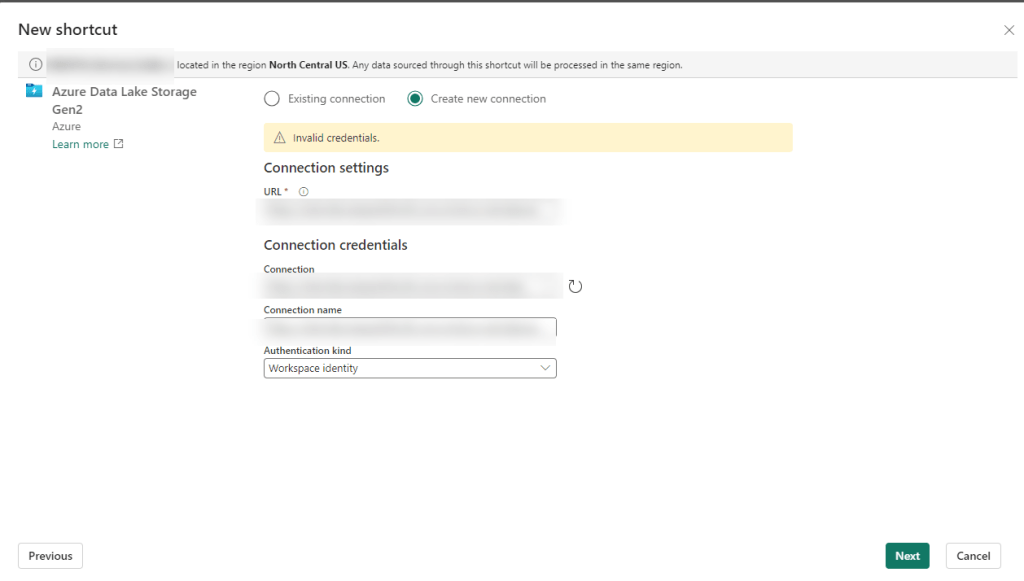
The problem seems to lie in the fact that P1 is not really an Azure resource in the same way an F sku is. So when you go to create your shortcut following all the recommend settings (more on that in a minute), you’ll wind up with some random authentication message like the one below “Unable to load. Error 403 – This request is not authorized to perform this operation”:

Screen shot with error message: "Unable to load. Error 403 - This request is not authorized to perform this operation"

You may not even get that far and just have some highly specific error message like “Invalid Credentials”:

Screen shot with "Invalid Credentials" error message.

Giving the benefit of the doubt – you may be thinking there was user error. There are a gazillion settings, maybe we missed one. Maybe, something has been updated in the last month, week, minute… Fair enough – let’s go and check all of those.

Building Fabric shortcuts, means you are building OneLake shortcuts. So naturally I first found the Microsoft Fabric Update Blog announcement that pertained to this problem: Introducing Trusted Workspace Access for OneLake Shortcuts. That walks through this EXACT functionality, so I recreated everything from scratch and voila! Except no “voila” and still no shortcuts.

Okay, well – no worries, there’s another link at the bottom of the update blog: Trusted workspace access. Surely with this official and up-to-date documentation, we can get the shortcuts up and running.

Immediately we have a pause moment with the wording “can only be used in F SKU capacities”. It mentions it’s not supported in trial capacities (and I can confirm this is true), but we were told that a P1 was functionally the same as an F64 so we should be good right?

Further down the article, there is a mention of creating a resource instance rule. If this is your first time setting all of this up, you don’t even need this option, but it may be useful if you don’t want to add the Exception “Allow Azure services on the trusted services list to access this storage account.” to the networking section of your storage account. But this certainly won’t fix your current problem. Still, good to go through all this documentation and make sure you have everything set up properly.

One additional callout I’d like to make is the Restrictions and Considerations part of the documentation. It mentions: Only organizational account or service principal must be used for authentication to storage accounts for trusted workspace access. Lots of Microsoft support people pointed to this as our problem, and I had to show them not only was it not our problem, but it wasn’t even correct. It’s actually a fairly confusing statement because the a big part of this article is setting up the workspace identity, and then that line reads like you can’t use workspace identity to authenticate. I’m happy to report using the workspace identity worked fine for us once we got our “fix” in (I use that term loosely) and without the fix we still had a problem if we tried to use the other options available for authentication (including organizational account).

After some more digging, on the Microsoft Fabric features page, we see that P SKUs are actually not the same as F SKU in some really important ways. And using shortcuts to an Azure Storage Account that are set using anything but to Public network access: Enabled from all networks (which BTW – is against Microsoft best practice recommendations) is not going to work on a P1.

Fabric F SKU versus PBI P SKU functionality image.

The Solution

You are not going to like this. You have 2 options. The first one is the easiest, but in my experience very few enterprise companies will want to do this since it goes against Microsoft’s own best practice recommendation: Change your storage account Network setting to: Public network access enabled from all networks.

Don’t like that option? You’re probably not going to like #2 either. Particularly if you have a long time left on your P SKU capacity. The solution is to spin up a F SKU. In addition to your P SKU. And as of the writing of this article, you can not convert a P SKU to an F SKU, meaning if you got that reserved capacity earlier this year – you are out of luck.

In our case, we have a deadline for moving our on-prem ERP solution to D365 F&O (F&SCM) and that deadline includes moving our data warehouse in parallel. Very small window for moving everything and making sure the business can still run on a new ERP system with a completely new data warehouse infrastructure.

We’d have to spend a minimum of double what we are paying now, 10K a month instead of 5k a month, and that’s only if we bought a reserved F64 capacity. If we wanted to do a pay-as-go, that 8K+ more a month, which we’d probably need to do until we figure out if we should do 1 capacity, or multiple (potentially smaller) capacities to separate prod/non-prod/reporting environments. We are now talking in the range of over 40K additional at a minimum just to use the shortcut feature, not to mention we currently only use a tiny fraction of our P1 capacity. I can’t even imagine for companies that purchased a 3-year P capacity recently. (According to MS, you could have bought that up until June 30 of this year.)

Ultimately many companies and Data Engineers in the same position will need to decide if they do their development in Fabric, Synapse, or something else all together. Or maybe, just maybe, Microsoft can figure out how to convert that P1 to an F64. Like STAT.

Why Can’t My Fabric Admin see a Deployment Pipeline?

You’ve assigned your Fabric Administrators and you’ve sent them off to the races to go see and do all the things. Except they can’t see and do all the things. OR CAN THEY? <cue ominous music>

My dog on the beach, crazy-eyed with anticipation, while a hand is on her.
Mango, crazy-eyed with anticipation about a new adventure.

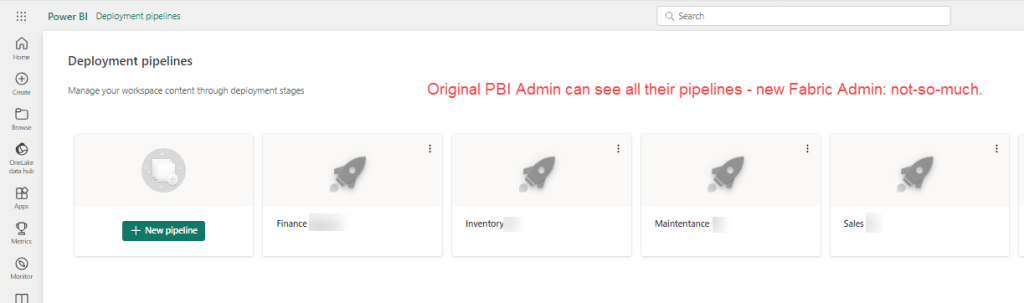
At first glance, Fabric Administrator #2 can’t see any of the workspaces PBI Administrator 1 created; some of them years ago. Let’s go ahead and fix that first over here.* Once you’ve gotten that all straightened out and they can see all the workspaces, you think you are in the clear for deployment pipelines? Nope, same issue: PBI Administrator #1 can see all of the deployment pipelines and newly minted Fabric Administrator #2 can see none. Waaa-waaaa (sad trombone).

*(If you only need the user / user group to see the workspaces relative to the pipeline, then read on for a helpful hint that performs the double duty of adding the security to workspaces and deployment pipelines at the same time).

Screen shot of PBI / Fabric deployment pipelines with the text "Original PBI Admin can see all their pipelines - new Fabric Admin: no-so-much."

To be fair, I’m fairly certain this would be the same case for 2 PBI Administrators, but since the Fabric genie has been let out of the bottle, I can’t say for sure.

What’s an admin to do??? I mean seriously, what does Admin even mean anymore?!?

Well if we are perfectly honest, there is a reason we’ve been telling you to set up User Groups. Because if the admin that had set up the pipeline to begin with had given access to the deployment pipeline to a admin user group to begin with, then we wouldn’t be here.

Generated pic of man kicking something on the ground.
Photo by cottonbro studio on Pexels.com

(Oh yea, well if you want to be that way then I say security should really be a part of the creating a pipeline option.) Look, do you want to play the blame game or do you want to find a solution? That’s what I thought.

To fix, go into the deployment pipeline and click on the Manage Access link.

Screenshot of a deployment pipeline with Manage Access link highlighted.

Then add your USER GROUP to the Access list Admin rights.

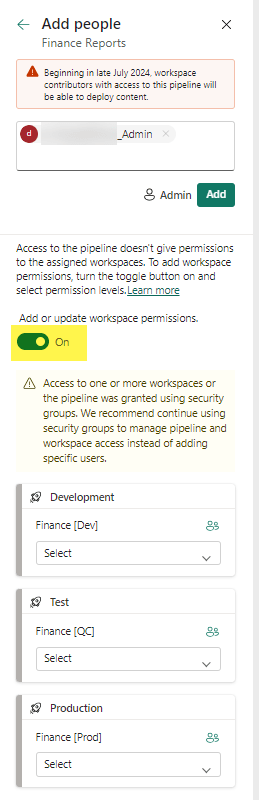
Screen shot to add people or groups to a pipeline.

If you haven’t already added the group to the workspace – then here is your chance to do it all together. Just switch the toggle button to Add or update workspace permissions to ON.

You can then set a more granular access to each workspace for the user group (or user, sigh) in question. Access options include Admin, Contributor, Member, and Viewer (though we may see more down the road).

That’s it. Throw a message in the comments if you’ve encounter any similar hiccups.

User Can’t Create a Workspace in Fabric

Recently my boss reached out to me with an interesting question: How can she create a workspace in Fabric’s Data Engineering section? When she clicked on create a workspace, and then the Advance tab, her License mode options were restricted to Pro or Premium per-user. She didn’t have any of the Fabric options.

Image showing Fabric workspace license options.

Our company is still under a Premium Capacity subscription which we will roll into a Fabric one once it completes, but according to Microsoft, our P1 Premium Capacity license is the same as a F64 license. In the Admin portal under Tenant setting, we have Microsoft Fabric options and even have the option Users can create Fabric items enabled. So what gives?

It turns out that in certain scenarios, you will need to also set this in the Capacity setting. In our case, we are keeping things pretty tight until we have our standards set up and will role things out to small groups. But to allow small groups to have access to this, you can add them to the contributor role under capacity setting. (I mean you could add people one by one, or enable for the whole org – you do you – but I’d advise against it. It’s hard to put the genie back into the bottle.) You could also add them to the admin role in the capacity setting, but again – I’d advise against it. These settings are ever changing and it’s hard enough keeping track of everything everywhere.

Admin portal capacity settings contributor permissions.

Yes you can add AD/Entra groups instead of users, and that’s really the route you want to go if you are dealing with anything large scale. I’m reminded of the Wizard of OZ when he says “ignore the man behand the curtain!” as my name is clearly listed in the image instead of a group, but that’s because I wanted to show a real world example.

Once you have added a user/group, click Apply. It took about 5-15 seconds for it to work it’s way through our system. Once that was complete, my boss had the Premium Capacity license available (which would allow her to create non-PBI Fabric items.)

What are some non-intuitive things you’ve found getting your company up and running on Fabric?

I wasn’t selected for PASS, and that’s as it should be.

This year I wasn’t select for PASS Data Community Summit and that’s a good thing. WAIT WHAT?

Meme with the text "whoa what the what?"

That doesn’t even make sense! Aren’t I supposed to be all “More Women Speaking”?!? Well yes. Here’s the thing – after reading a lot of the abstracts, seeing how many people submitted, and knowing mine was kinda niche AND that I had rushed my general session submission- I realized it shouldn’t have made the cut.

There I said it.

At some point I even did some back of the napkin math and realized purely from an odds standpoint (all other things being equal), I had about an 8%-11% chance of being selected. After reading a lot of abstracts I realized that if I HAD been selected, then that would have meant I was selected more because I was a woman, and not because it was a submission that rose to the top. And that is DEFINATELY not what I would want. Yea, yea, I realize that some of this is arbitrary because it’s based on different volunteers’ opinions, but I still would have felt a bit sad if mine had made it after reading others, and I would have thought my gender played a role.

You see, a lot of my younger years I was sometimes told I was selected for things because I was a woman. Often by people not even in my field. In one case, by a [male] friend of mine! People that had never worked with me and didn’t have my bosses handy to tell them different. And I have no qualms telling you that my bosses would. Case in point: my last boss CC’d me on an email he sent to another person touting me as “The Purple Unicorn they were looking for”, without telling me beforehand. (This was after I left the company and ironically, I wasn’t even looking for a new position.)

Being a Woman In Technology doesn’t mean I want my voice risen above others. That would imply that we care about gender over quality. Even worse – it would imply that there isn’t enough quality women voices, and that simply is not true. (I’d argue that it is often the opposite problem with more average men in the industry – simply based on numbers.) Plainly put, I want our industry to figure out WHY it’s difficult to get more women speakers and address it from that problem. Heck, lets tackle why so many of us leave IT and how to put more women in the pipeline while we are at it. Wait, I have a whole list of things if you really want to get me going…

But back to the main topic: I wasn’t selected for PASS and that’s how it should be. Remember how I said I rushed my general submission and it was kinda niche? Turns out there are 2 similar sessions that made it and though they are not the exact same as mine, they are with same core technologies and are less niche then my submission. And with better abstracts. One is being presented by a woman and one by another under-represented group. I’ll be sure to attend.

T-SQL Tuesday #176: One piece of advice you wish Past You had

Admitting this is my first T-SQL Tuesday contribution seems a bit weird for me to write. I mean I’ve been in this industry over 20 years. (Ok, maybe 25 is more accurate.) I’ve been in the sql community for well over a decade.

t-sql Tuesday logo

But when one of my favorite authors, #sqlfamily rockstar, and all-around awesome human being Louis Davidson, posted on it earlier this month, I was intrigued. He wanted us to answer the question: What advice do you wish Current You could go back and give past you as you were starting your first data platform job?

At first I was giddy about all the things I could write about. But the more I thought about it, the harder it became. Do I write from a technical standpoint? Process? Personal? And what about the Butterfly effect? If Current Me gave first data platform me advice, couldn’t that completely alter where I am now in all aspects? Clearly I was going down a rabbit hole, which explains why I am writing this now on Tuesday evening at 11:33 PM. (Apologies in advance for any typos.)

So on some unexpected errands I had today, I had a little downtime and pulled out my little notepad to make a list. Immediately I saw a problem that I hadn’t even considered: things that I hold to be very important to me today, I couldn’t have heeded that advice 20+ (25) years ago. Things I take for granted and can easily say or do today, as a young women in tech I couldn’t do many years ago. Or at least “I” didn’t feel like I could.

“Speak up for yourself”.
“A company won’t love you back – so outside of work hours only give them what you want to take away from your family or have a genuine interest in doing.”
“Delegate more”
“Don’t knowledge hoard.”
“Don’t be afraid to admit when you don’t know something.”

And while each of these things are spot on, when I was a single mom with a mortgage living pay check to pay check and had to a.) make myself invaluable and b.) make myself likable/agreeable/whatever-else-you-want-to-call-it, those things often conflicted with real life. Things are not always as easy as they sound. Especially as a woman. The times I didn’t do both a and b, I’d get into trouble.

Going no where with any of those things, I moved to looking at things from a technical perspective. That wasn’t helpful either; I’ve always followed where the jobs were and most of my jobs only resembled each other because “data” was in the name. That’s given me a pretty wide (if not always deep) range of experience. My ADHD loves it. I’ve had a lifetime of “learn this new thing really fast” and its been fantastic.

Striking both personal and technical things off my list (ok fine, I didn’t have anything technical on my list- though my calibre library will call me a liar on that one), I guess I am left with Process. Which it a good thing because I have about 4, no 3 minutes until the midnight bell tolls. Here it goes:
“Use Checklists as often as you can” and “Learn and Use Value / Effort matrixes” (Is that even allowed to be plural?)
Oh yea, and don’t sweat the typos. They’ll throw you under the bus for time – every time.

Screen shot that shows I posted at midnight and missed the Tuesday deadline.
Dang typo cost me that minute…