Migrating data solutions to the cloud: a checklist Part 1 of 9

If you are a follower of me in the various places or a reader of this blog, you know that recently I presented the session Migrating data solutions to the cloud: a checklist at SQLBits 2023. As promised in the weekly wrap-up from April 7th, here is the first installment of a more in depth dive to that session. The session had 9 parts to it and so I thought that would make for nice chunks to consume in blog posts. I’ll add links to each one so it will be easy to navigate once all of the posts are up.

The Parts are broken down as follows:

  1. Pre-Planning and Evaluation
  2. Discovery
  3. Assess
  4. Architecture
  5. Costs
  6. Migrate
  7. Testing
  8. Post – Migration
  9. Resources and Closing

This post will focus on the first item in the list Pre-Planning and Evaluation.

Let’s get right to it! Ok ok. I know you are probably chomping at the bit wanting to immediately get into the technical parts – I know how it goes – but that is not where you start.


King from Alice;s Adventures in Wonderland

“Begin at the beginning,” the King said, very gravely, “and go on till you come to the end: then stop.”

― Lewis Carroll, Alice’s Adventures in Wonderland


Goals

What is your company’s goal of moving to the cloud?  Some examples are:

  •   Reduction in CapEx (capital expenditures)  
  • Lower reliance of complex and/or end-of-support technologies
  • Optimization of internal operations
  • Reduction in vendor or technical complexity
  • Preparation for new technical capabilities

Modernization? Cost-savings? Multiple things? Maybe your current infrastructure is at end-of-life, and it just really makes sense to modernize it and move it over to the cloud before you are dead in the water. Or maybe your goal is to reduce downtime for managing infrastructure and upgrades .

What is the problem you are trying to solve? Is there a business requirement driving this or maybe something else? Make sure you understand what the problems are you are trying to solve and if your goals actually address those problems. That is a business decision that has to be determined WITH your technical team and not necessarily BY your technical team. I’m a technical person, and I’m going to be the first person drawn by the shiny new object – which often is not the best thing for the company strategy.
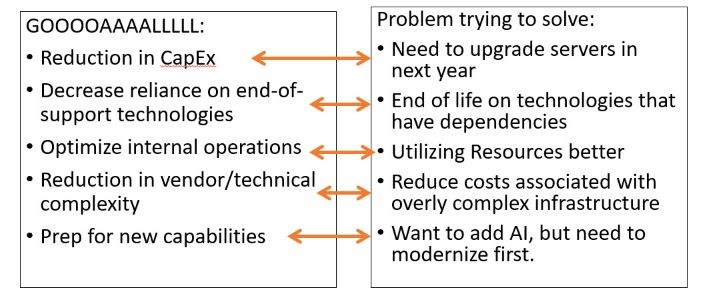
Image matching goals to problems trying to solve.

Ultimately your problems can drive a portion of your goals, but you may have additional objectives. These items need to be determined upfront so the choices you make during the process align. They create value streams for your organization. Higher ups love to hear about value streams!

Once you have your objectives – you can create a plan and KPIs towards those objectives and then show how you met those at the end. This is our objective, this is the state at the beginning, this is the state at the end. Look how far we’ve come!!!

It’s hard to have project success if you don’t define what your objectives are. This is a project, and if you’ve been working on projects for a while, you know how easy it is to go sideways and lose sight of your goals. Sometimes those goals change a bit, and that’s ok, but ultimately your success will be measured by if you achieve clearly defined goals that you can apply metrics towards.

Support

Blocks that contain the text "Executive Support" and "Stakeholder buy-in".

Executive Support

Many times, you will go into a migration project that is being driven by the top level. Maybe your CEO went to a conference or read some important articles – and if so, you are ahead of the game (well, until you have to set expectations properly). But if you don’t already have executive support, then you need to identify an executive sponsor. Someone who is high up and can lead a cultural shift within your organization. A Champion. <insert bugle sounds here>

Stakeholder Buy In.

You need to Identify and involve key stakeholders early in the process. On both the business and IT side. Involvement and communication is key.

People don’t like change. Try telling a bunch of financial analysts that have been doing their job for over 20 years and have lived through multiple technology shifts – try telling them they won’t have Excel anymore. I promise you; it won’t be pretty. Rather than focus on what you are taking away – focus on why the change is needed, and what it gives them. How can you get their buy-in for your project, while still being honest.

If you don’t have that executive support or stakeholder support, then you may need to a little digging. What are your company’s core values? What is the 5- and 10-year plan for business initiatives? How does moving to the cloud address these?  At the department level – what are primary goals and concerns from a technical perspective. How can moving to the cloud help this? Everyone’s answer will not be the same but look at how you can align key stakeholder needs with the goals of the C-Suite. Building a business case that addresses top concerns and how the cloud will help – is ideal for this situation.

Teams

The next thing we need to consider is what we will do in-house versus what we may pull in a partner for.
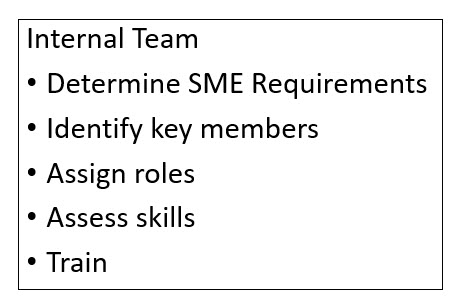
Internal Team:
-Determine SME Req
-Identify key members
-Assign roles
-Assess skills
-Train

For your internal team – first determine the different areas you will need a SME (subject matter expert) for, and a good idea of what they need to know. Second, identify potential key people you may have in-house to fulfill these roles. Ideally you will have people in your organization from across many teams  that you can assign to roles. Once you have assigned roles to people, you need to assess their skills. This will allow you to see what gaps you need to fill and then plan for how your org will both fill and monitor those domain gaps?

When possible, identify potential team members that either have the skills or can upskill. Build a skills readiness plan. Investing in your people is far cheaper than hiring outside help. Consultants are great – I know, I’ve been one, but there is no replacement for having in-house knowledge, particularly once those consultants have finished and walked out the door – potentially without much knowledge transfer. The people that will be maintaining and growing your systems need to have the skills.

That said, in some cases, you may want to hire outside help. Maybe many of your team members are really spread thin, or the upskill process doesn’t match the timeline – then definitely bring in consultants.

Common things for partners to be involved in:

  • Strategy: Help with defining all things such as business strategy, business cases, and technology strategies
  • Plan: Help with discovery tasks, such as assessment of the digital estate and development of a cloud adoption plan.
  • Ready: Support with landing zone tasks.
  • Migrate: Support or execute all direct migration tasks
  • Innovate: Support changes in architecture
  • Govern: Assist with tasks related to governance
  • Manage: Help with ongoing management of post-migration tasks

Along the lines of consultants – help them help you. Does your company have standards or best practices that are specific to your industry or workflow? Share that with them. Share any and all documentation that is relevant to your migration and environment.

If your company is able – consider Creating a board for key team members to interact and meet regularly: like a Cloud Center of Excellence (CCoE). Key members are chosen from each  IT areas to meet at a specified cadence to discuss all things Azure including identifying domain gaps. Those key members not only gain knowledge about technical aspects, but also get insight into projects that are going on through the different areas of the company. And they can take back that information to their team with a level of consistency. Which is super important when you are wanting establish best practices and standardize policies across teams.

Documentation

Now we need to find out what we have regarding documentation.

From the technical side you need to assess at what your current infrastructure looks like. What type of documentation do you have for your data estate and infrastructure?? Where is your data? What does your data require for things like storage and memory? What are all the components that connect to what you want to move? If you don’t know what your current infrastructure looks like, you need to determine how and who will document that for you.

On the business side: What are business requirements for your systems?  Do you have regulatory requirements? SLAs mandating certain uptimes? What about other Business requirement docs for security, compliance, backup, Recovery Point Objectives (RPO) and Recovery Time Objectives (RTO)?

And finally – have you previously tried to do a cloud migration? What documentation is left over from that? Is it current? What were some of the successes and some of the failures? Any lessons learned?

You don’t have to know everything at this point, but you do need to find out what you have and what you don’t have. And if we are perfectly honest – what may be out-of-date. This is where you need an Enterprise Architect and some in-depth meetings with the different departments. Communication is key to getting the documentation and finding what you have, what you don’t have, and what you may need down the line.

Welp, that concludes Part 1: Pre-Planning and Evaluation. What would you add to this list? Have I missed any additional parts that you’d like to see in the over all series? I love to get feedback to consider so feel free to reach out.

Stay tunned for Part 2: Discovery.

Weekly Wrap Up – April 7, 23

Weekly Wrap Up:
New Stars Of Data shoutout
SQLBits 2023 Reflections
Planned upcoming content and activities
Favorite Items of the Week in the Wild

Bit behind on the blog, but I’ve made a couple of tiny improvements recently. My initial idea with the blog was “just get it up as quickly as possible” with little regards to formatting and functionality (beside just reading a post). If I’m honest, these are the things that have slowed me down in prior attempts to get content out there: gold plating. Now that it’s been up for awhile, I did some quick edits on the back end so you can at least jump to specific categories, tags, or do an easy follow. It’s still bare-bones, but right now getting more content out is my goal for the spring.

Weekly Wrap Up:
New Stars Of Data shoutout
SQLBits 2023 Reflections
Planned upcoming content and activities
Favorite Items of the Week in the Wild

New Stars of Data shoutout

This is super long overdue, but my ADHD makes me procrastinate often and things fall by the wayside. Not a great excuse, but I’ll own it.

First off, if you don’t know about New Stars of Data (run by Ben Weissman and William Durkin) and you love learning all things data virtually – then please take a gander. New Stars of Data is a fantastic program to get new speakers a chance to get out there. Speakers get one on one mentoring every step of the way and the program helps new speakers deliver great content and get them on the road to speaking. How do I know? That’s where I started! (So yes I have a lot of love and bias towards the program).

The next event is May 12, 2023 and I’m really excited about the line-up. Please consider joining the event not only to get great content, but to support and encourage new speakers. If you are unable to attend the event (or a particular session), then NSOD posts the videos later to the DataGrillin youtube page. Plus – if you are really serious about wanting to get more women into speaking – this is a part of it. After I spoke at NSOD, several user groups reached out to me to keep the ball rolling. All which resulted in my next topic: SQLBits 2023.

SQLBits 2023 Reflections

Confession time: when I submitted to SQLBits last year, I didn’t really expect my session be accepted. I had started a new job Dec 2021 after a long hiatus and I stopped speaking so I could focus on getting where I wanted to be for my new company. Seeing the call for speakers for SQLBits, I promised myself I’d at least submit and choose a topic that I thought would also be great for my company. Not knowing if I’d be able to travel, I submitted to do a virtual session, which I knew there were limited spots available

And then it was accepted.

Cat GIF putting paw to mouth

Here is where I will give a tiny bit of advise: As soon as you are accepted – start working on your presentation. You have no idea what will come down the pipeline to derail you. Everything that could throw my schedule out the window – did. You have been warned: what you do with that knowledge is up to you.

Now a few weeks after the event, I can comfortably say it was incredible. Not just as a speaker – (WHICH WAS AMAZING), but also as an attendee. Even as a virtual speaker/attendee. While I did miss the interaction and fun at the actual location – the level of detail that was provided every step of the way was beyond my expectations. I still felt a part of the event (and yes even dressed up for my session!).

Kristy dressed up as Elf with little friend on shoulder

I can not express how much I appreciate the opportunity not only to speak at such a great event, but to do so virtually. As a woman in tech with children – traveling has been a great barrier for me and is a large part of what prevented me from speaking in earlier years. So thank you Organizers of SQLBits for allowing this option – I know it comes at great cost and work for organizers and volunteers. By having this option, it helps me represent women in the community and still be a part of something really special. The experience was one I will never forget, and while traveling overseas to present was never on my list prior – it is a new goal for me for future years.

Planned Upcoming Content and Activities

While I’m high off of speaking (and getting good reviews!) from SQL Bits, I’ve gone ahead and submitted sessions for a few other events and I’m considering another large one. That one is in person, so I’m still waffling a bit on it. More about that in a future post. Hopefully you’ll see lots more of me speaking this year. My main issue (besides traveling) is that I have so many ideas and I always want to do THE NEXT THING, so I haven’t really refined the art of reusing a session. And for me, creating new content is a really laborious process. Hopefully as I do it more, I’ll figure out how to get better at that.

That said, my slides for SQLBits session “Migrating data solutions to the cloud – a checklist” should be available soon through the SQLBits website. (The holdup is me.) An interesting thing I learned when creating my session was I had way too much content. Probably about 4 hours worth. And I had to go back and chop a lot out. So my goal over the next few months is to transfer that chopping into a series of blog posts. If you made the session – first-off THANK YOU – and secondly, the blog posts will be a more in depth coverage of each section I went over. Expect a lot more technical aspects in certain sections.

Finally, I’ve got 2 new other initiatives I’m working on that are specific to women in tech. They are both in the beginning phase so I can’t go into details on one of them, but the other one is Tracy Boggiano and Deborah Melkin‘s women’s mentoring program: Witspiration! For all the ups and downs of being a woman in tech, I have to say that it has made such an incredible difference in my life and I want to share that with others. From a kid that had so much going against her, being a woman in tech has given me opportunities that I would have never have had otherwise. Expect to hear more of about that in the future.

Favorite Items of the Week in the Wild

Yesterday I was thinking about this as a routine feature on this blog that includes both fun things and technical stuff, but for this week it’s only going to include 2 items – FUN STUFF. Mostly because I just started saving things late yesterday and also because I’ve far surpassed the time block I gave myself for today’s post.

With that I give you:
1.) Ian Coldwater‘s adventures into Kubernetes erotica by ChatGPT. If you don’t already follow Ian, you should. They are full of all kinds of awesomeness.
2.) Generative AI by Auralnauts : Your favorite 90’s song “Ice Ice Baby”, performed by the cast of Matrix. And Wilford Brimley for some reason.

Have a great weekend!

#TidBitTrenches: SSMS Errors on Load

New install of SQL Server 2019 produced an interesting error upon opening SSMS.

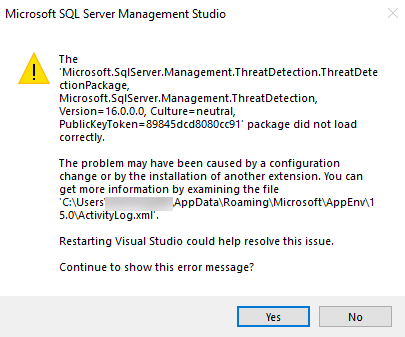
Ran into an interesting issue today. Upon opening a new install of SQL Server 2019, I received the below error:

SSMS Error message. Text of error message below image.

The Microsoft.SqIServer.Management.ThreatDetection.ThreatDetectionPackage,
Microsoft. SqIServer.Management.ThreatDetection,
Version=16.0.0.0, Culture= neutral,
PublicKeyToken=89845dcd8080cc91’ package did not load correctly.
The problem may have been caused by a configuration change or by the installation of another extension. You can get more information by examining the file C:\Users\<username>\AppData\Roaming\Microsoft\AppEnv\1 5.0\ActivityLog.xml‘.
Restarting Visual Studio could help resolve this issue. Continue to show this error message?

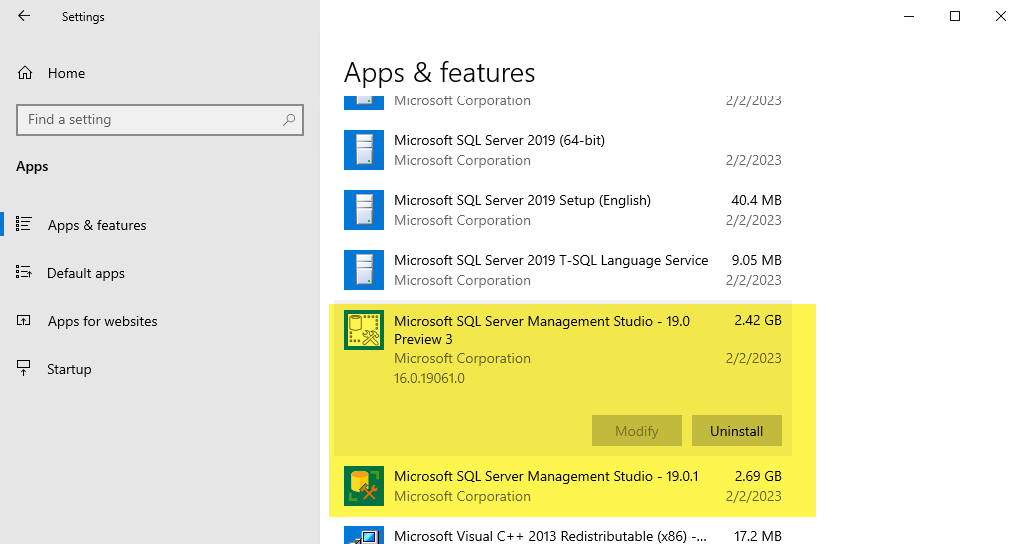
UGH. Not helpful. I do what any reasonable IT person does – I google the error. Not super helpful either. I look back at the error message. Wait a minute. That version number looks odd. Since this is a new box, I look at what has been installed.

Installed apps image highlighting 2 versions of SSMS

2 versions of SSMS? That in itself is not normally an issue, but it was the Preview version that gave me pause. Went to the authoritative voice – Microsoft – and said:

SSMS 19.0.1 is the latest general availability (GA) version. If you have a preview version of SSMS 19 installed, you should uninstall it before installing SSMS 19.0.1.

Ok. Fine. I’ll follow the rules. This once. I uninstalled both versions and then installed the most current version.

Gene Wilder gif from Young Frankenstein with text: "Its Alive" From https://media.tenor.com/SuADVxKkQ-AAAAAC/frankenstein-its-alive.gif

And just like that, I was back in business. Not even a reboot needed.

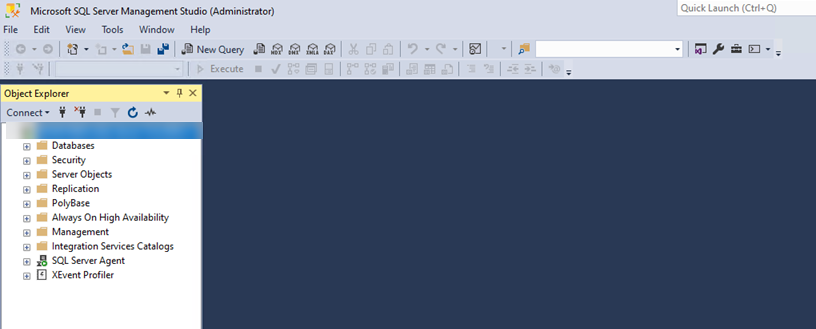
SSMS window without errors this time.

#TidbitTrenches: Production fixes

Why you shouldn’t rush to a fix in production.

Recently we ran into an issue with one of our Production SQL Server boxes. We knew the fix: we’d have to upgrade to SQL Server Enterprise. And quick. My server guy asked me if he needed to block out time THAT DAY so we could get things rolling. It’s a reasonable question, he needs to make time in his schedule to do such tasks. I said no.

WHAT? WHY? Because years of experience (and impulsivity) have taught me you first stop and think.

Some examples of things that I had to think about in this situation:

  • Did I want to upgrade our version along with our edition? (Yes, yes, I did)
  • If yes, what version – the latest? (Probably not)
  • Do I want a new server or is this an in-place upgrade? (New Server)
  • What else does could this affect? (Lots)

Tons of other things to think about, but since this is post is supposed to be a tidbit, we will stop there. Here’s the thing – we could have affected a lot.

Let’s address each of these examples to give us an idea of what can go wrong. First off, our current SQL Server version is in extended support and we are missing out on features I want to implement. These features match with our company’s goals over the next few years, and our next big lift should be more Azure focused than SQL Server version focused. That means I don’t want to install another version 1 year from now. I’m a busy gal and 1 year goes by quickly!

Does that mean I want the latest version? More bang for the buck – right? Brent Ozar’s post Which Version of SQL Server Should You Use? gave me pause. And when I thought about it more, I realized we may have compatibility issues with other apps that interact with our databases on that server. (BTW: checked with one of the vendors and they confirmed they’ve done ZERO testing on the latest SQL Server version and do not know any current clients that are using it.) So I needed to really weigh benefits versus risk on what version we should go to.

What about in-place upgrades? While I’ve done more in-place upgrades than I care to count, occasionally they can cause unexpected issues; I didn’t want to add more variables when I was already tackling an issue fix. Full stop.

And finally – what else could this affect? This is such a fundamentally important question that really I could have just had that as a singular bullet point. How does your data flow? Are apps that are part of the data flow process going to play nice with your changes? What is connecting to it? Do you even know? What is your plan when you get a ton of support calls because things aren’t working that you didn’t even know about? If you’ve never encounter this type of scenario – go take a look at the book: The Phoenix Project. I listened to the audio version years ago and seriously LOL’d at some parts because I felt like I had lived it. I’m not alone in this.

Final thought: Before being the superhero and trying to fix something super fast in Production, stop and think. You’ll probably find a temporarily solution that will hold you over until you’ve tested out any major changes. And that’s your tidbit from the trenches for today.

PBI: Report couldn’t access the data source

PBI data source error: Sometimes the easiest thing to check is actually the cause of the problem.

You’ve opened a report in PowerBI Service and you get the dreaded “This report couldn’t access the data source. Contact <author name> the author, to have it fixed.”

Image of the error message.

As we are expanding our report offerings and learning more with PBI Service, we get this message a lot. Often it’s a security issue, and this post isn’t about that rabbit hole, but rather a short and sweet reminder about a preliminary check that is often overlooked: is your data source up and running?

A lot of times in our Dev environment we’ve had something go wonky with our tabular model and need to re-Process the database. (That’s what dev environments are for – right?) This is what happened this morning when one of our developers reached out with this error message. As I first started heading down the security route, I paused and decided to check the database first. Ding-dong! Nothing weird in PBI, it was our tabular model. A quick checked of a few tables in the cube confirmed that it wasn’t giving anything to anyone. Reprocessing the cube and then refreshing both the data AND the page(s) that give the error message in PBI cleared everything up.

Moral of the story and to put a twist on Occam’s Razor: check the easiest thing first.

Presenting… Me! At SQLBits 2023

At the end of last year I vowed to get back into speaking. I’m in a great place in my new job and have had some time to do some training I wanted to catch up on. And so, on a whim, I submitted a session to SQLBits 2023 (yes on the last day, don’t judge). For those not in the know, SQLBits is one of the largest data conferences in the WORLD (don’t believe me? Look at the stats on the website!). It’s also in Newport, Wales. And I’m not…

Traveling is not always an option with small kids and my husband’s schedule, but I noticed that the organizers were accepting a small number of remote sessions. Even better, you had the option to change to in-person if your situation changed. Thus the “I don’t know right now if I can travel to Wales at that time” excuse was eliminated.

Then came the theme. Having organized a fair bit of SQL events in Atlanta years ago, we always went big on the theme. My inner geek LOVES a good themed event! Can you guess what the theme is for SQLBits this year?

Some random picture I took in Denmark at some place I forget now.

DUNGEONS AND DRAGONS.

IN WALES. (My kids actually have tiny red dragons from our friends that were living in Wales for a bit.) That settled it, I was going to submit: if only for the small chance that I would be able to do something – I have no idea what – along the lines of a D&D theme. So on the last day, probably the last hour, I went ahead and submitted a session.

AND IT WAS ACCEPTED. Hoolllly Guacamollllllle.

SQLBits agenda with my session on it: Migrating data solutions to the cloud - a checklist.

The official title: Migrating data solutions to the cloud – a checklist.

Session Summary: So you’re the data person in your company and you need to look to the sky. Maybe you’ve been wanting to do it for a while, maybe it’s a mandate coming from the top. What are the steps you need to think about? Where do you even start? What are the risks? How can you begin to wrap your head around all the different things you have to coordinate? Companies don’t just need the IDEA that they should move to cloud, but a guide on how-to-do it. This session will not only give you that guide to get you going, but a foundation to take to your bosses to show just how awesome you really are.

Put aside I was actually shocked, I’ll admit to getting a little teary-eyed. I’m incredibly honored to be speaking among many of my idols and droves of speaker friends that I admire. Like blown away honored. TBH, I’m was a little disappointed that I’d have to miss other sessions that are playing at the same time. Fortunately the sessions are recorded, so I’ll still be able to catch them at other times.

If you are interested in attending my session , it’s on Saturday March 18th (the free day!!!) at 8:40 AM CDT (that’s 1:40 PM Newport time). I’m super happy (for many reasons) to be presenting on Saturday – but the conference itself is from March 14th – March 18th: 5 whole days of data goodness with a side of D&D theme. (I went ahead a bought a basic D&D kit for Christmas to indoctrinate my littles.) The last day is free, but I will be attending virtually for multiple days because this conference really is filled with a lot of incredible training opportunities.

On that note, GO REGISTER. The Early bird pricing ends on the 13th. For the cynics among you, I do not get anything for you registering except the warm and fuzzy feeling that I’m helping the community. Here – I’ll even put a convenient copy/paste link for you: https://events.sqlbits.com/2023/pricing. For those of us that can’t attend in person, there is a virtual option at a 30% discounted price.

Well, that’s all I wanted to announce. I’m officially presenting for a major international conference. Little ole me. (Special thanks to New Stars of Data and others for getting me started – more on that later.) Hope to see you there on the screen or in some of the community portals. Or maybe even in-person with a little magic.

Picture of female wizard from D&D
Copywrite: https://www.wargamer.com/dnd/wizard-5e-class-guide

PBI: When you can’t change from a live connection

First off, I want to say I never intended to start a lot of my posts about Power BI. There are plenty of experts out there and I am merely an accidental PBI Admin and advocate for our Power BI platform. So why should I be writing about a topic I’m constantly learning new things about? Well, here’s the thing: when you are in the middle of learning things and you don’t find a quick and easy answer, that may be a good time to say “hey, maybe I should blog about it”.

And I think it was Kimberly Tripp’s keynote at PASS Data Community Summit 2022 that reminded me that it’s 100% ok to write about things other people have written about. In fact, several people there mentioned this same thing. Share what you have learned – it’s quite possible you bring a different perspective that will help someone along the way. And if all else fails, you may forget the solution and years down the road google it only to find your own post. (#LifeGoals)

Rihanna with ponytail - text: "Yup thats me"

Now that we have that out of the way, let’s talk about WHEN YOU CAN’T CHANGE FROM A LIVE CONNECTION in Power BI.

Recently, I’ve been advocating that we consolidate our reporting systems. We have a ton and with an extremely small team, it’s a huge headache to manage them all. Admin-ing reports are only supposed to be a small portion of my week-to-week tasks. (Hint: it’s not.) Plus, some of our reporting systems are just not that good. I won’t list all the different systems, but we are lucky enough to have Power BI as part of our stack and as such, I’m wanting to move as much as we can to our underutilized Power BI service. This includes our Power BI Report Server reports.

Since we needed to make some changes to some reports we had on Power BI RS, and wanted to reap some of the benefits of Power BI service with them, we decided these reports would be a good test group to move over. The changes were made in the newer version of PBI Desktop (instead of the older version of desktop we have to use with PBI RS) and we were ready to load them up to our Power BI service. This is where it got a little sticky.

Sticky buns with sticky spoon next to it.

sticky buns… mmmmmmm

FOCUS.

When I uploaded a new report, I remembered it was going to create a “dataset” with the report. Even if the lineage showed the dataset went to a live connection to a database. (In the case of our test case reports, they were connected to a SSAS database). Note, these datasets don’t seem to actually take any space when connected to a live connection, hence my quotes.

Shows a newly created dataset when you upload a new report.

A dataset for every report? Given the number of reports we needed to move over, all with the same live connection, this didn’t make sense to me. Even if the dataset was just a passthrough. (Did I mention how I really hate unnecessary objects in my view? It eats away at me in a way I really can’t describe.)

Diagram showing current state of a dataset for each report, even when connected to 1 data source.

So I thought – “why not just create 1 live connection dataset and have all the reports in the workspace connect to that?” (We also use shared dataset workspaces, and if you are using that method, this still applies. In this case I wanted to use deployment pipelines, and as of the writing of this post, that wasn’t doable with multiple workspaces per environment .) I built my new dataset, uploaded it, and prepared to connect my report to the new one.

SCREECH. Nope. After all that, when I opened my shiny new report updated RS report in PBI Desktop, I didn’t even get the option to change the connection.

Report showing live connection

Darn it. I couldn’t switch it to the new dataset. My only option was the original live connection. I couldn’t even attempt to add another data source.

I grudgingly loaded the report back up to PBI Service and now I had to look at 2 datasets while I noodled. Blerg. (I’ll mentioned again how much I hate a cluttered view.) Technically I could delete my test case dataset, but I wasn’t ready to give up yet. An idea occurred to me: let me download the newly uploaded file from the PBI Service, because logically it had created a new dataset to use when I uploaded it and the lineage showed it in the path.

I opened the report in the service, choose File–>Download this file, and then selected the “A copy of your report with a live connection to data online (.pbix)” option. (Actually I tried both, but the other way was a fail.)

Then I opened it in PBI Desktop… Meh. It looked the same.

Wait a minute! What is that at the bottom??? “Connected live to the Power BI dataset”!

I check the data source settings again under Transform data – BINGO! Now I had the option to switch the dataset from my Power BI service. Which I happily did.

After this was done, I saved and reloaded the report to PBI Service and checked the data lineage of the dataset – It was connected to the new dataset! YAY!!!!!! Since all the reports in this workspace used the same SSAS database, I could connect them all to the same singular dataset. Bonus that when it came time to setup the deployment pipeline, I only needed to change the data source rules for one dataset in each proceeding environment.

Some may say this is overly obsessive. Maybe. But when you think along the lines of maintenance or verifying data lineage, I now only needed to check 1 dataset instead of going through a whole list. That can be a timesaver when troubleshooting problems.

AND it’s prettier. AND there may be other reasons you want to change that connection and this should help along the way. AND there was another big reason I was going to list, but now I’m thinking of sticky buns again so we will just leave it right there. It’s time for lunch.

SSRS/PBI RS Error: Cannot read the next data row for the dataset

I’m an accidental SSRS / Power BI Report Server / PBI.com Administrator, along with my other do-all-things-data duties. It’s been a hot minute (cough years) since I’ve messed around in SSRS and I’m relatively new to PBI – both from the reporting and the administering side. Years ago I did some work with Tableau, but my most recent work in that realm was more R and Python based. Suffice to say – I run into issues a lot. Particularly with PBI Report Server (PBI RS).

Pssst – hint – PBI Report Server is basically the same as SSRS, so if you find some obscure problem and everything you google results in regular PBI answers, try googling the same problem with SSRS. Different database name, same almost everything else. YOU’RE WELCOME. You have no idea how much time I’ve just saved you.

That said, this specific error I came across was in SSRS, but really you could get this error from any of the reporting products.

You’ may receive an error that vaguely resembles this:

An error has occurred during report processing. (rsProcessingAborted)
Cannot read the next data row for the dataset <objectname> (rsErrorReadingNextDataRow).
For more information about this error navigate to the report server on the local server machine, or enable remote errors

While there are probably MANY reasons you may receive this error, I’m going to talk about one here: XML. That’s right, your old frienemy XML.

In our case, we were getting XML documents from AX/various sources, and storing them in another database in an ntext column. <insert obligatory “I didn’t build it” disclaimer>. So when another process was pulling it … say for a report... it was barfing all over the place. Running a snippet of sql that the report was using, resulted in a more helpful message:

Msg 9402, Level 16, State 1, Line 15
XML parsing: line 1, character 38, unable to switch the encoding

What’s in line 1 of all these xml documents? The XML Prolog.

You wanna know something else? It’s optional. And that pesky little UTF-8 encoding is causing all of your woes. My suggestion: find what is adding the prolog to your XML docs and get rid of it. (Unless it’s a person, then just tell them to cut it out.)

There are alternatives you can do, but I wouldn’t recommend them. I’ll list some here in case you want to experiment (I didn’t.) You could clean the data and remove the prolog (aka declaration or header information), but that’s a messy solution that will probably have to be changed over time. (More than you would think at first glance.) If you are on SQL Server 2019 or above, you could also consider using the UTF-8 encoding support they introduced – even at the column level – but that could have unintended consequences, and again, unplanned maintenance down the road. Personally, I have enough to do – thank you very much. (If you want to investigate this route here’s a handy dandy little article Introducing UTF-8 support for SQL Server. )

If you aren’t dealing with an ntext column, then you may have some additional alternatives here: XML Parsing – Unable to switch encoding using utf-8 when casting from NVARCHAR. But again, you run into the issue of changing column types/lengths and from personal experience, that can cause other big headaches. Don’t say you weren’t warned.

That’s it. I didn’t really plan on making my first kinda techie article to be about SSRS/PBI/XML – but it happened to me today and now it is yours. Use it as you want or stuff it in a turkey.

Speaking of turkey: my daughter drew a great pic last night of a turkey that didn’t look exactly like a turkey because she “wanted to draw a turkey that people wouldn’t want to eat”. Unfortunately it got messed up and I can’t share it with you. As a poor substitute, I give you a turkey from Summer of 2021 that was contemplating his attack on ME.

Turkey about to attack me.

Hope you all have a wonderful Thanksgiving holiday!

–Data Work Mom

PASS Data Community Summit 2022 Schedules – Part 2

Note:  I decided not to add all the links like I did in Part 1. That took a crazy amount of time and I’m not feelin it while traveling. It’s easy enough to log on to the PASS Data Community Summit 2022 website and check out the info or go old school and google it. I will let this fall in the mom lesson #124 of “don’t do for them what they can do for themselves”. Call it tough love.

PASS Data Community Summit Part 2: The Thursday/Friday edition.

Originally I thought I was going to post this over the weekend, but we had some unexpected trip-ups of a environment promotion I had to tend to: Ahhh –  fun times of trying to get things done under the wire before you leave for a trip. You know not to do anything major, but the small emergencies can get ya too. And of course everyone wants THEIR thing done before you leave. Especially before the holidays kick in. I totally get it.

So while I’m sitting in the Chicago airport waiting for my [now] delayed flight, I wanted to get Part 2 in real quick. Well, at least before my battery goes kahpoot.  I wrote part of this at the airport, but had to finish after a day of hilarity ensued. This is a somewhat shortened version

Thursday: November 17th, 2022

Thursday I decided to do a little different than Wednesday. I’ll probably be exhausted from late travel on Monday catching up with me and then intense focus on Tuesday and Wednesday and thought shorter sessions may more be inline. Again, this could and will probably change by Thursday – I make no guarantees.

Breakfast event: Breakfast with the Microsoft team: SQL Futures and Strategy. You had to sign up for this event separately, and thankfully I did a few weeks back because I saw today that the registration is now closed. This is an early morning event, but since it won’t require much focus I think I’ll be ok.

8:00 AM – 9:15 AM – Keynote: Doing More with Less: The Challenges Ahead for Every Data Professional Steve Jones, Jakub Lamik, Kathi Kellenberger, David Bick, and Arneh Eskandari

This should be an interesting keynote as it is always on my mind. Knowing what to plane for is pretty essential in our field.

9:30 AM – 10:00 AM: Architecture Options in Data Warehousing and Modeling – Leslie Weed

Alternate/On-demand options:

  • Implementing Intelligent Edge Solutions with Azure IoT & AI – Mihail Mateev  (9:30 AM – 10:45 AM)
  • Storytelling with Data in Power BI – Pragati Jain  (9:45 AM – 10:45 AM)
  • Database DevOps in Azure: Prepare for Ludicrous Speed! – Pete Benbow  (9:30 AM – 10:45 AM)
  • How to Maintain the Same Level of utilities in Cloud Deployments – Denny Cherry (9:30 AM – 10:45 AM)
  • Use your Baseline to find Problem Queries – Allen White
  • Moving an Availability Group to a New Environment without Downtime – Steve Hall (9:30 AM – 10:45 AM)
  • Securing and Protecting Content in Power BI: Practical Tips – Melissa Coates  (9:30 AM – 12:30 PM)

10:15 AM – 10:45 AM: Getting Started with Database DevOps – Liz Baron

Alternate/On-demand options:

  • How to Use PowerShell to Get Data From Any Power BI REST API – Gilbert Quevauvilliers
  • Azure Data Factory Essentials for SSIS Developers – Tim Mitchell

11:15 Am – 11:45 AM: Modern Data Warehousing with Azure Synapse Analytics – Ginger Grant

Alternate/On-demand options:

  • Monitoring SQL Server at No Cost – Danilo Dominici (11:30 AM – 12:30 PM)
  • Performance Tuning for Azure Cosmos DB – Hasan Savran (11:15 AM – 12:30 PM)
  • Women in Tech: Becoming the Ally – Deepthi Goguri (11:15 AM – 12:30 PM)
  • Getting Started with Database Source Control – Kathi Kellenberger
  • Kusto Query Language – The Next Query Language You Need to Learn – Hamish Watson (11:15 AM – 12:30 PM)
  • Stabilize Query Performance without Changing Code – Erin Stellato
  • Durable (non-technical) Strategies for Success with Analytics – Tom Huguelet (11:15 AM – 12:30 PM)
  • Useful Insights into Azure Synapse Data Explorer –  Warren Rocchi (11:15 AM – 12:30 PM)
  • Azure Data Factory ABCs – David Alzamendi (11:15 AM – 12:30 PM)

12:00 PM – 12:30 PM: Implementing a Datalake House in Azure Databricks – Jeff Renz

Alternate/On-demand options:

  • Getting Started With Unit Testing in tSQLt – Sebastian Meine

12:30 PM – 2:15 PM: Women as Tech Leads – Tackling the Challenges – Shabnam Watson, Jen McCown, Anna Hoffman, Blythe Morrow, Leslie Andrews

2:30 PM – 3: 45 PM: I’m still undecided here. 2 great ones on completely different topics.

  • Keeping your data fresh in Power BI – Patrick LeBlanc, Adam Saxton
  • Data Driven Disease Damage Control – Helge Rege Gardsvoll

Alternate/On-demand options:

  • Automate Development Database Refresh from Production – Andre Quitta (2:30 PM – 3:00 PM)
  • Finding the Right Data Types – Kevin Wilkie
  • Using Power BI with Lots of Data – Paul Turley
  • Fold on Tight – What is a Query Folding and Why Should I Care? Nikola Ilic (3:30 PM – 4:00 PM)
  • Getting Started Building Data Solutions on Azure – Hugo Barona (3:30 PM – 4:00 PM)
  • Practical Data Engineering with Spark – John Miner (2:30 PM – 3:30 PM)
  • Unit Testing T-SQL – Jay Robinson
  • Coaching for Managers: An Introduction – Eduardo Gregorio
  • Practical Experiences from Working with Synapse – Mathias Halkjær and Brian Bønk
  • Choosing the Azure SQL DB Tier: Tales from the Trenches – Reitse Eskens  (2:30 PM – 3:00 PM)
  • Better Data Governance with Purview – Kelly Broekstra  (2:30 PM – 3:30 PM)
  • Better Together: Power BI and Azure Synapse Analytics – Bradley Schacht
  • VLTs: Very Large Tables – Problems, Options, THE Solution! – Kimberly Tripp

4:15 PM – 5:30 PM: Deploy a Self-Service Analytics Sandbox in Azure Synapse Analytics – Oscar Zamora and Tahir Abdullah

Alternate/On-demand options:

  • How to use Data Lineage in Azure Purview? – Erwin de Kreuk
  • How to Tune a Multi-Terabyte Database for Optimum Performance – Jeff Taylor
  • Migrating your Data to the Cloud? Look Out! Here’s What you Need to Know – Emanuele Meazzo
  • Kusto Query Language – The Next Query Language You Need to Learn –  Hamish Watson (4:15 PM – 5:15 PM)
  • From SQL Server to Cosmos DB in 75-Minutes – Martin Catherall

Friday November 18th, 2022

Sadly on Friday, my flight time was changed to 2 hours earlier. Meaning that I’ll really only have morning to grab some sessions. If I leave by about noon, then I should be ok – so after the keynote and first session, I’ll probably be only attending the hall-sessions I keep hearing about. A layover in Phoenix may be allow me an online session – but I also may be completely done by then.

8:00 AM – 9:15 AM Keynote: 30+ Years of Innovation: How Do We Keep Up with Technology? – Kimberly Tripp

Another pretty on-point keynote on a subject that I continue to hear people talk about through the years.

9:30 AM – 10:45 AM: Building a Regret-free Foundation for your Data Factory – Meagan Longoria

Alternate/On-demand options:

  • GitHub + You + Microsoft Docs – William Assaf
  • Power Up Your Data Warehouse with Pre-ETL Processing – Erin Dempster
  • Power BI Composite and Hybrid Models – Alex Whittles
  • Query Shaping – Advanced Query Tuning – Edward Haynes   9:30 AM – 12:30 PM
  • Power BI: From Self-Service to Enterprise – Just Blindbæk  10:15 AM – 10:45 AM
  • Data Transformation Magic with Power Query – Jackie Kiadii
  • SSDT Methodologies for SQL Server DevOps – Eitan Blumin  9:45 AM – 10:45 AM
  • Intro to SQL Server Tools – Deborah Melkin  10:15 AM – 10:45 AM
  • Performance Monitoring, Tuning and Scaling Azure SQL Workloads – Deepthi Goguri and Surbhi Pokharna
  • Introduction to SQL Audit and Audit Reports – Daniel Maenle 9:30 AM – 10:00 AM

The rest of these will have to be on-demand options for me, but I still wanted to list them since they were are part of my favorites group.

On-demand:

  • Tracking History: Temporal Tables vs Ledger Tables – Ed Leighton-Dick 11:15 AM – 11:45 AM
  • How to Fix a Report I didn’t Build – An Ugly Baby Story  – Reid Havens 11:15 AM – 12:30 PM
  • Improve Performance by Automating the Query Store – Chad Crawford 11:15 AM – 12:30 PM
  • Analyzing Azure Monitor Log Data for Azure SQL Database – Taiob Ali 11:15 AM – 12:30 PM
  • Creating a career portfolio using GitHub – Joshua Higginbotham  11:15 AM – 12:30 PM
  • Azure Synapse Analytics and the Power of Datamarts – Joanna Podgoetsky 11:15 AM – 12:30 PM
  • Enterprise Semantic Models in Power BI Premium  – Christain Wade and Kay Unkroth 11:15 AM – 12:30 PM
  • Power BI – Discover DAX Fundamentals Through Common Mistakes – Fowmy Abdulmuttalib – 11:30 AM – 12:30 PM
  • Pro Tools for Performance Tuning: Baselines, Monitoring and Workload Tests – Martin Guth  11:30 AM – 12:30 PM
  • Can Microsoft Purview Answer All your Data Governance Needs – Angela Henry 12:00 PM – 12:30 PM
  • How to Run a Successful Proof of Concept (PoC) –John Martin   2:30 PM – 3:45 PM
  • Data Lakehouse, Data Mesh, and Data Fabric (data architecture soup!) – James Serra 2:30 PM – 3:45 PM
  • Handle Azure SQL Auditing With Ease – Josephine Bush 2:30 PM – 3:30 PM
  • Architecting for High Performance SQL Server on Virtual Machines – Anthony Nocentino   2:30 PM – 3:00 PM
  • Testing your Data Factory – Benjamin Kettner and Frank Geisler 2:30 PM – 3:45 PM
  • The Autistic Data Professional’s Guide to the Job Search – Chris Voss  2:30 PM – 3:45 PM
  • Migrate Your SSIS Skills to Azure Data Factory – Koen Verbeeck  3:30 PM – 4:00 PM
  • When to Stop Tuning a Query – Milos Radivojevic 4:15 PM – 5:15 PM
  • The Dream Team: Synapse Analytics Serverless SQL Pools and Pipelines – Andy Cutler 4:15 PM – 5:15 PM
  • Power BI Model Development Best Practices in a Team – Mathias Thierbach 4:15 PM – 5:30 PM
  • Performance Mythbusters – Paul Randal 4:15 PM – 5:30 PM

That’s it. That’s the full shabang. If you are at Summit and see me – feel free to say hello! I’ll be the short lady that looks kinda mom like.

PASS Data Community Summit 2022 Schedules – Part 1

Note: Sessions listed here are ones I am specifically interested in for one reason or another at the time of this writing. It’s a mix of one part stuff I think will be helpful to my company, one part things I’m SUPER interested in, and one part sitting in sessions with a group of speakers that I know and want to hear. Sessions that were in-person had a higher priority when I had to choose between different sessions, which is perhaps unfair, but with traveling I want to be in-person as much as possible. Sessions not listed have zero baring on their quality – there are simply only so many hours in a day – even with the on-demand option.

Inspired by Louis Davidson‘s post: The PASS Data Community Sessions I am Most Excited For, I decided to write my own. Because all that time I’ve obsessed spent looking at the schedule should be put to some use AND I’m hoping it will help me get over my writers block. That said, after looking at the schedule I created with the Favorites I tagged, I realized that this post would probably be best in multi-parts. Part 1 will focus on Tuesday and Wednesday activities.

All the sessions!

There is a lot of sessions in this post, but basically I’m trying to plan for next week and the next 12 months. Also with 489 sessions, obviously my choice can and will change over time. But I like to have a plan. LIKE REALLY REALLY like to have a plan. An initial one and one I can pivot to quickly if needed.

I’m not going to rehash what PASS DCS 2022 is, you can get all the info here: https://passdatacommunitysummit.com/. If you can’t attend in-person for any reason but still want to attend – there is a great online option and an option for on-demand recordings. I attended online last year (which was the only option) and was pretty impressed with the ability to interact with others, even outside the sessions. This year I will be in Seattle for the event, (thanks awesome company that I work for!) but they also purchased the 12 month on-demand recordings option. That way I don’t have to always choose between sessions: just which ones I see during the summit. (Note: links to sessions probably require you register for the site. You are on your own for that.)

I’m guessing that a lot of people choose the All-In-One Bundle, but I did a more ala-carte registration. 3-day conference + One Day Pre-Con + On-demand recordings for 12 months. My company saved a whole 7 dollars going this route – but I really wanted the on-demand recordings and I wasn’t sure how great I’d be at pre-cons. <insert record scratch>

I’ll be honest – pre-cons kinda scare me. I’m neuro-diverse and 8 hours is a long time to hold my attention and I get big anxiety about it. That said, I made it through grad school with a 3.93 (dangit worldwide pandemic)  learning Python/R, analytics, statistics, AI, etc., so I realize that it may be all in my head. [so’s everything 1:49]. I signed up for one pre-con, and if that goes well, than I may go for 2 next time.

Tuesday

Choosing between Pre-cons was pretty difficult. Like SUPER DUPER difficult. Ones that particularly interested me were:

Ultimately I went with Denny’s Azure Infrastructure pre-con as it aligns best with key initiatives for my company. I’m on a small Cloud CoE team and we are planning some complicated moves to the cloud; I want to make sure I have my ducks in row – particularly with best practices. I’ve been privileged to see many of Denny’s presentations back when I was an organizer for SQL Sat in Atlanta, and I’m super excited to get to attend one of his pre-cons. Also, I’m studying for several certification exams (which one depends on the day), and this will reinforce topics that may be outside some of my current experience.

Just by happenstance, I have also signed up for Denny’s PASS Karaoke Party 2022. I’ve only been to Karaoke once in my life, and even then I was just a backup dancer (if you can really even be a backup dancer to Gangsta’s Paradise“), so this should be interesting. Truth be told, haven’t been out-out since about 4 years ago, so I’m game. Just don’t expect me to sing or stay out too late (I’ve got a big next day!)

Wednesday

Here is where it gets super complicated. Mostly because I keep changing my mind. Some sessions I initially planed on, I saw later were online and I went back and changed them for in-person sessions. I have some internal conflict doing this for multiple reasons (another post for another day) , and I may go and change things 10x by Wednesday (or there may be times that my “overwhelmedness” kicks in), so nothing is really set in stone.

Luckily I purchased the 12 month on-demand option (I get nothing for writing this in case you are wondering), thus I have a pretty sizeable list of alternates. For any of the times listed below, you will sometimes see a different time listed in the alternates section. This is because the session has a slightly different time than the original. I will spare you the different colored highlights in my original OneNote doc, because I don’t need to expose all the crazy.

Drum role please….Here is my current schedule.

8:00 AM – 9:15 AM: Transform your Data Estate with Microsoft’s Intelligent Data Platform. Keynote – Rohan Kumar

Keynotes are always good for “big picture” info and this one is right in line with my company’s needs: integrating databases, analytics, and governance.

9:30 AM – 10:45 AM: Confession – I still haven’t made up my mind on this one yet. Here are my 2 main choices. I have some experience in both, but I feel like I need a reset.

Alternate/on-demand options

11:15 AM – 12:30 PM: Tips and Tricks for Azure MigrationsMelody Zacharias

Alternate/On-demand options

2:30 PM – 3:00 PM: Another one I still haven’t fully decided on. So sue me.

Alternate/On-demand options

3:15 PM – 3:45 PM: AMA with the Azure Data Community Advisory BoardDeborah Melkin, Rie Merritt, Monica Rathbun, Tillmann Eitelberg, Wolfgang Strasser, Gaston Cruz, and Javier Villegas

Alternate/On-demand options

4:15 PM – 5:30 PM: Lightning Talks 1 Andy Yun, Blythe Morrow, David Bojsen, Meagan Longoria, John Morehouse, Randy Knight

Alternate/On-demand options

Congrats! You’ve made it to the end of Part 1. Excuse me while I go do some *very serious computer schtuff* while listening to Coolio. Or something.

What are some of the favorite sessions you are looking forward to?