

In our world of AI generated material, I wanted to be clear that content posted by me has been written by me. In some instances AI may be used, but will be explicitly called out either in these article notes (e.g. if used to help clean up formatting, wording etc..) or directly in the article because it is relevant to what I am referring to (e.g. “Fabric CoPilot explains the expression as…”). Since articles are written by me and come from my experiences, you may encounter typos or such since I am ADHD and rarely have the time to write something all at once.
Recently a colleague of mine was inquiring about creating a service principal to use with a Microsoft Fabric Rest APIs proof of concept project we were wanting him to develop for some governance and automation. Since he was still in the research phase, I told him we already had one he could use and did a brief demo on how we use it with FUAM (Fabric Unified Admin Monitoring tool). It occurred to me that others may find this a useful way to learn how to use Fabric or PBI Rest APIs. If you are also fairly new to using pipelines and notebooks in Fabric, then you can get the added bonus of learning through an already created, well-designed and active live Fabric project in your own enviroment. If you do not have FUAM installed in a Fabric capacity, or do not have permissions to see the items in the FUAM workspace, or have no intention/ability do change either of those blockers, then you can stop reading here. Unless you are just generally curious – then feel free to read-on. Or not. You do what works for you.
Incidentally, if you haven’t implemented FUAM and are actively using Microsoft Fabric, I highly recommend it. There is a lot of great information about your environment that is all in one place, and has great potential for you to create add-ons. You don’t even need a heckuva lot of experience to implement it, and once you get the core part up and running, it’s pretty solid (with regular updates that are optional).
How FUAM Uses Fabric Rest API Calls
The FUAM workspace/project uses Fabric/PBI API calls (in part) to collect various information about your Fabric environment. It uses other things too like the Fabric Capacity Metrics app, but for brevity we will only cover the REST API stuff here. FUAM stores information in it’s FUAM_Lakehouse located in the FUAM workspace. The lakehouse includes info on workspaces, capacities, activities, and a ton of other information about things that go on in Fabric.
To see what is collected for FUAM from API calls, you need to first look at some of the pipelines. Go to your FUAM works and filter for Pipelines.
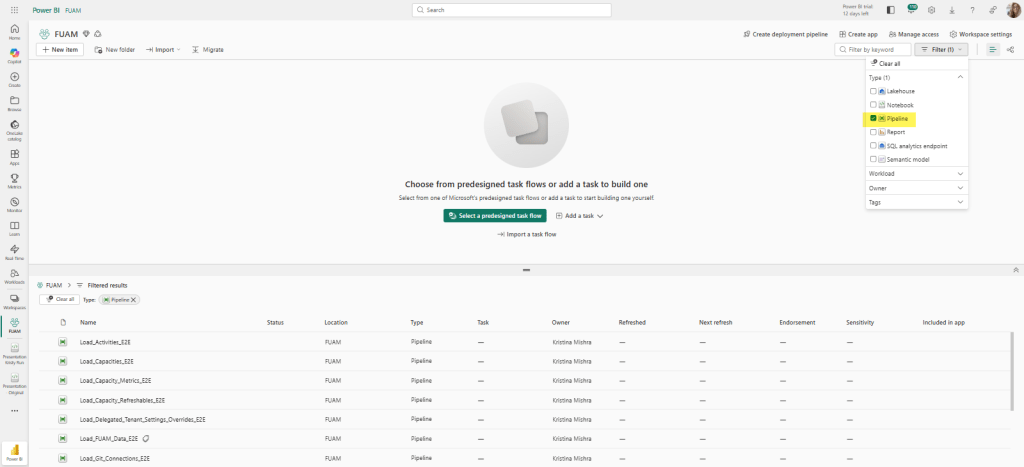
Yes, the image above shows the PBI view but it is same-sies for the Fabric view. Or close to it. You probably won’t have the tag next to the Load_FUAM_Data_E2E pipeline like I do, but that’s because I implemented a tag for that one myself. It’s the main orchestration pipeline that I want to monitor and access separately. Plus it’s the main one you access on the rare occasion you need to access any of them and I’m a visual person. All this to get to the point: that’s NOT the pipeline we want to use here.
A quick note on why you may not want to start from scratch for a project that uses Fabric REST API calls if you already have FUAM and all needed access to FUAM object.
- You get a real world example that you can add on to if the information you need isn’t already in the lakehouse.
- You don’t have to go through setting up a new service principal / enterprise app in Azure.
- You don’t risk doing duplicate calls of the exact same information in different places.
- Depending on what you are doing with the REST API and what capacity size you are on, calls can really raise your CUs.
- You may get a tap on the shoulder from the security team if they see too many tenant info API calls.
- There is a 500 request per 100 workspace Fabric REST API limit. You may think that there is no way you will hit that, but when I first set up FUAM , I definitely hit it a few times as I was tweaking the job runs.
So how FUAM use the REST API calls? That depends on what you are doing and how you are accessing it, but for the purposes of this post, we are going to review how it uses it inside pipelines (the first path in the image below).

For our first example, let’s take a look at the pipeline: Load_Capacityies_E2E. If you look at the Copy data activity, you will see where the Source uses a data connection that was previously set up (in this case, the data connection uses a service principal to connect).
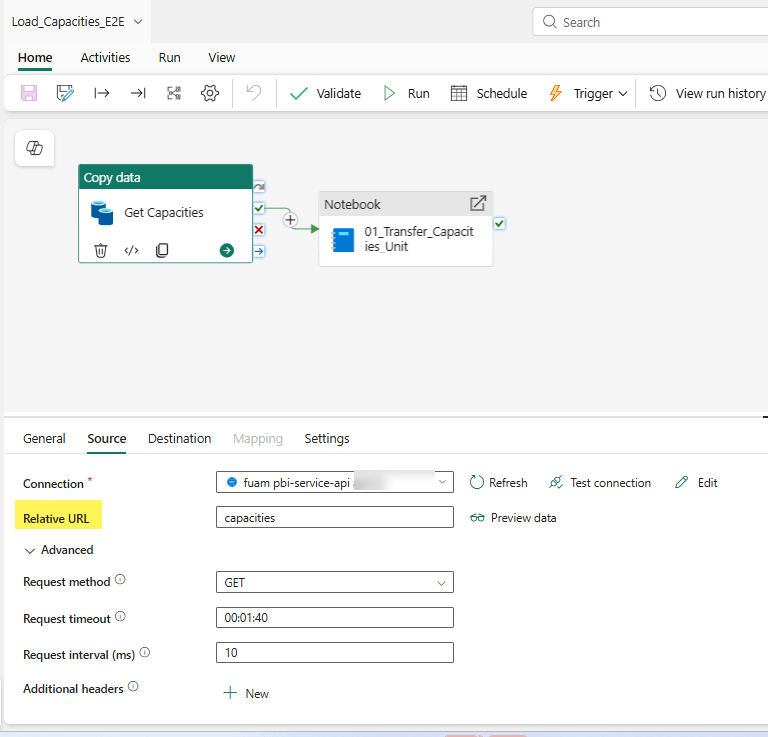
But it’s the Relative URL and the Request method that is doing the heavy lifting here. This is where the API call is occurring. And if you want more information on how this is automagically happening, then click on the General tab and you will see a handy dandy URL provided in the Description section.

What is going on from Image 3, is really that Relative URL value doing the HTTP request: GET https://api.fabric.microsoft.com/v1/capacities

This is where the magic really occurs because it makes the API call and plops the info into a json file into the FUAM_Lakehouse under Files–>raw–>capacity.

Looking back at Image 3 – the pipeline component – we see there is a notebook. The notebook listed there (01_Transfer_Capacities_Unit) is really about pulling the data from the json file, cleaning it and adapting it to a medallion architecture that ultimately lands in the Table section of the lakehouse. (That’s the short description, you should pop open the notebook yourself to walk through how that is done. If you are new to notebooks and want a walk through of what each line of code does, then plop the code snippets into Co-Pilot. It does an excellent job of code walk-thoughs.
But the heavy lift to get the data is done in the Copy data task which stores the result of the API call in the json.
That was the simple straightforward example. Once you’ve mastered that rabbit hole, you can move onto a more advanced example in FUAM: Workspaces. Workspaces is slightly different. It still uses a copy data activity in its pipeline, but it’s a little hidden (unless you are looking at icons) in the Load_PBI_Workspaces_E2E pipeline.
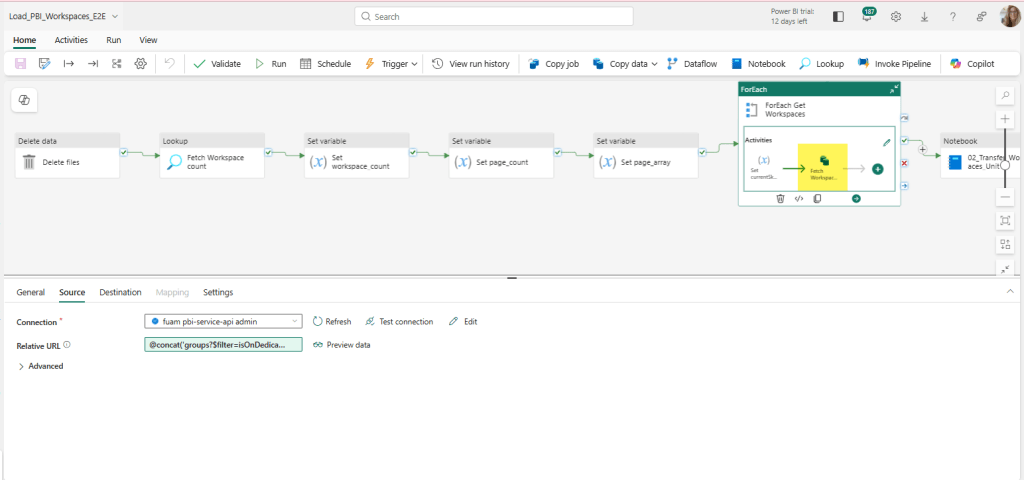
If we explode (aka – double click) that out from the pipeline, we can see the Copy data activity a little easier.

Now the Relative URL looks different. The Relative URL here uses a Pipeline expression builder. Here is the full expression:
@concat(‘groups?$filter=isOnDedicatedCapacity eq true&$top=’,variables(‘limit’),‘&$skip=’, variables(‘currentSkip’))
Fabric Copilot explains the expression as follows:
| This expression builds a URL string for a REST API call to fetch a list of groups (workspaces) that are on dedicated capacity. It uses the concat function to join several parts together: – ‘groups?$filter=isOnDedicatedCapacity eq true&$top=’: This is the start of the URL, specifying that only groups with isOnDedicatedCapacity set to true should be returned, and that the number of results should be limited by the $top parameter. – variables(‘limit’): This inserts the value of the pipeline variable ‘limit’, which determines how many results to return per page (for example, 5000). – ‘&$skip=’: This adds the $skip parameter to the URL, which is used for pagination (to skip a certain number of results). – variables(‘currentSkip’): This inserts the value of the pipeline variable ‘currentSkip’, which tells the API how many results to skip (for example, 0 for the first page, 5000 for the second page, etc.). The final result is a URL like: ‘groups?$filter=isOnDedicatedCapacity eq true&$top=5000&$skip=0’ This URL can be used to fetch a specific page of workspaces from the API, with the number of results and the starting point controlled by the ‘limit’ and ‘currentSkip’ variables. This is useful for processing large numbers of workspaces in batches (pagination). |
All this to say it still calls the REST API with some added criteria, and then plops the result in a json in the FUAM_Lakehouse under the Files->raw->workspaces directory. The notebook 02_Transfer_Workspaces_Unit is similar to the capacity example, in that it pulls the data from the json file, cleans it and adapts it to a medallion architecture that ultimately lands in the Table section of the lakehouse.
Now What?
The possibilities of what you can do it pretty big. Take a look at the list of REST APIs available and suit to your needs (and permissions). Personally I’d be inclined to store it in the main FUAM lakehouse (with source control implemented of course), but I can see use cases that may put it in another workspace.
Besides using the FUAM workspace as a live example of working calls to REST APIs you can also extend your FUAM module to include more information from REST APIs that it may not already capture. It may end up being a great candidate as an add-on to your FUAM reports, or elsewhere if you want to limit security in your FUAM workspace. If you try any of this out, please share your experiences, creations, and this article so other can learn and grow as well. That’s what makes our community strong for the decades I’ve been lucky to be a part of it.
 Data Work Mom